비전 강점 표출 - 손승우 upscale
시작하면서…
애셋을 maplestory.io 통해 받았는데, 준비하며 그것이 불법이라는 것을 알았습니다.
특히 저작권 문제에 아주 민감할 것으로 생각되는데, 이미 과제를 불법으로 만들어 제출하였기에…
죄송합니다. 만약 불합격한다면 모든 애셋은 지우고, 포트폴리오로도 사용하지 않을 예정입니다.
계기
제가 qa agent과제로 열정은 보여줬다고 생각하나,
다른 지원자에 비해 “강점”이 명료하지 않고, (vision ai로 무엇을 풀어낼 수 있는가?)
“약점”은 명료한 상황이었습니다.
(경력이 짧고 text 기반 ai로 문제를 푼 적이 없다는 점)
이에, 제 강점 (vision ai 로 생산성 만들기) 를 보여드리고,
제 약점 보완 (단풍 llm 발표에 쓰인 네모트론 합성 데이터 제작 - CPT - SFT - 등등을 직접 구현하며 그 과정을 공유) 를 보여드리고자 합니다.
결론부터
따로 학습을 진행한 SwinIR모델로
기존 도트 해상도를 2배 끌어올리는 데에 성공.
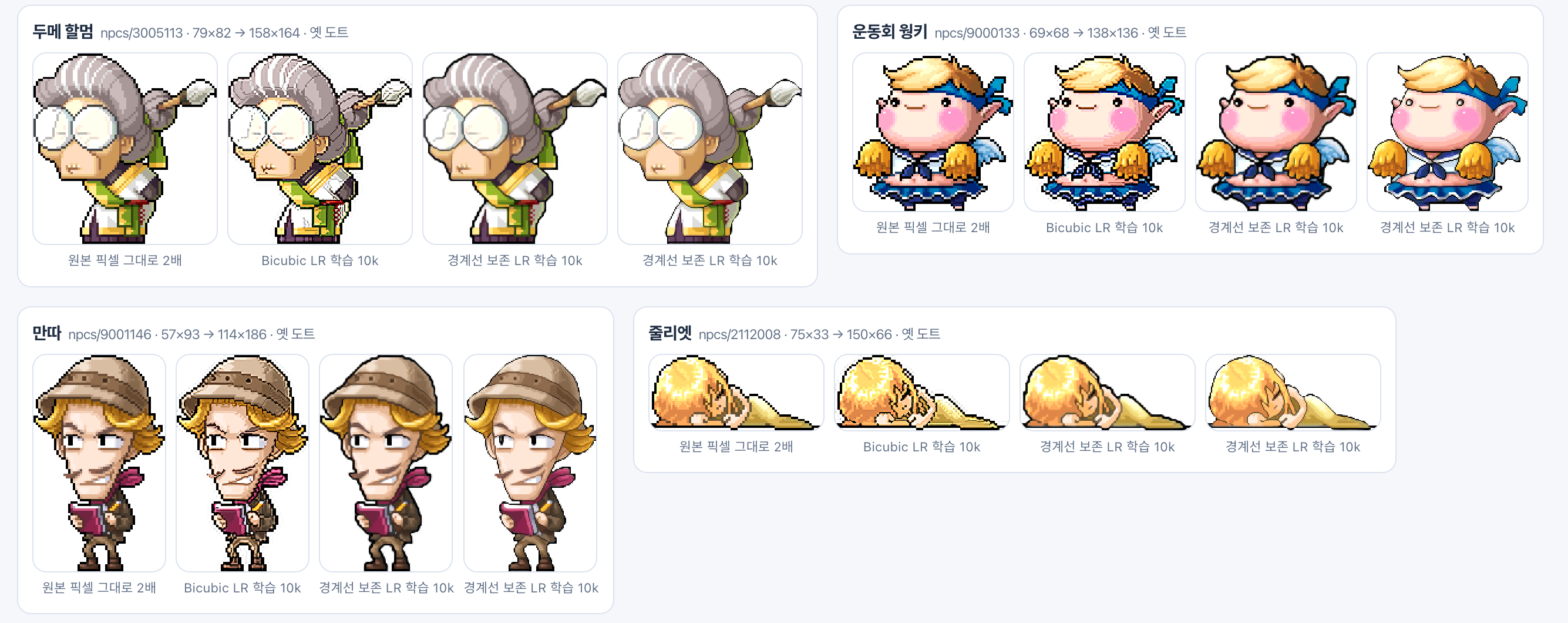
자세한 수행과정
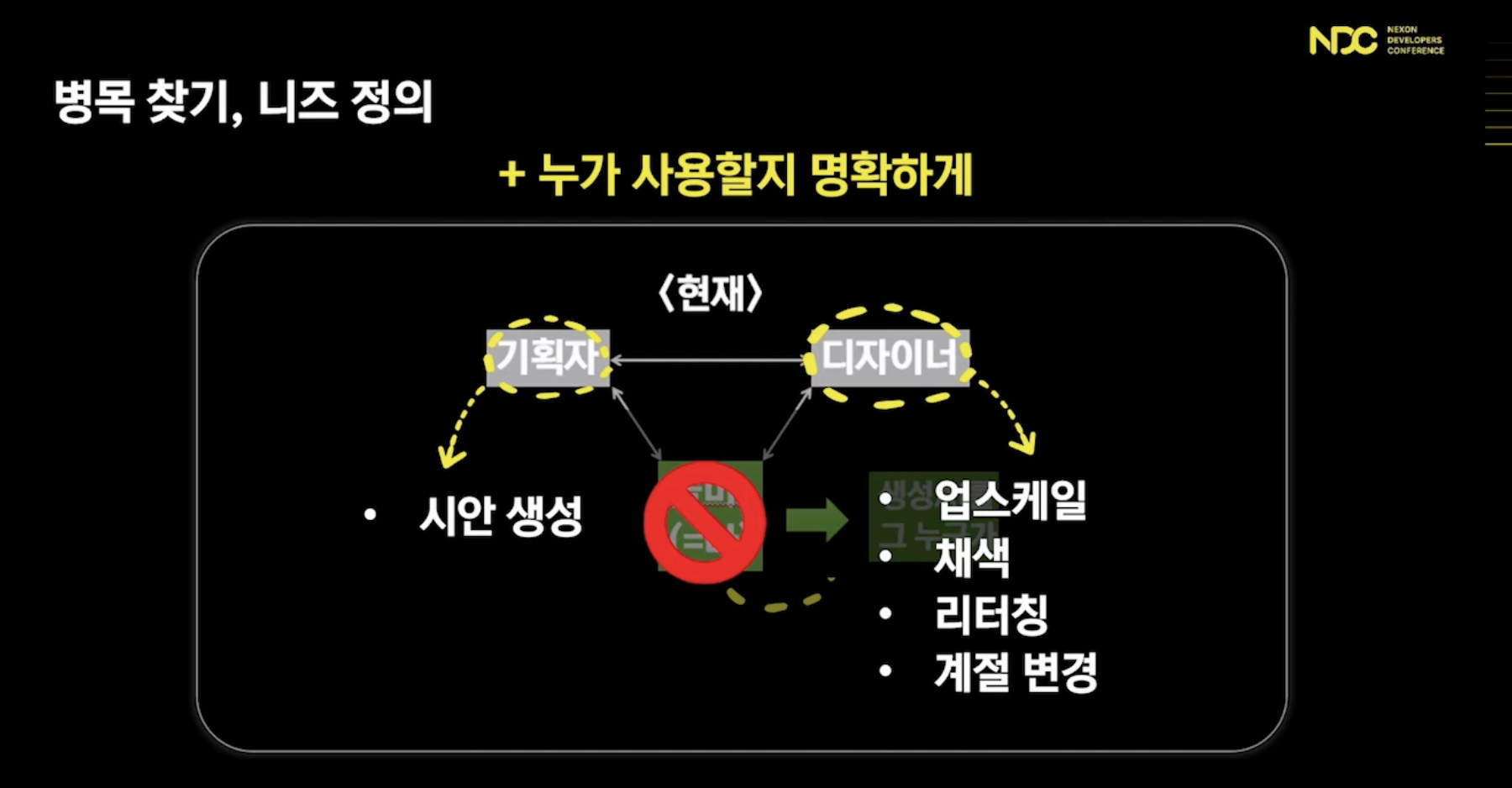
풀 문제 선정
제가 어떤 문제를 풀어야 어필할수 있을지 고민한 결과
고민 과정
- 게임 리소스 또는 콘텐츠에 대한 레이블링, RAG 데이터베이스 구축
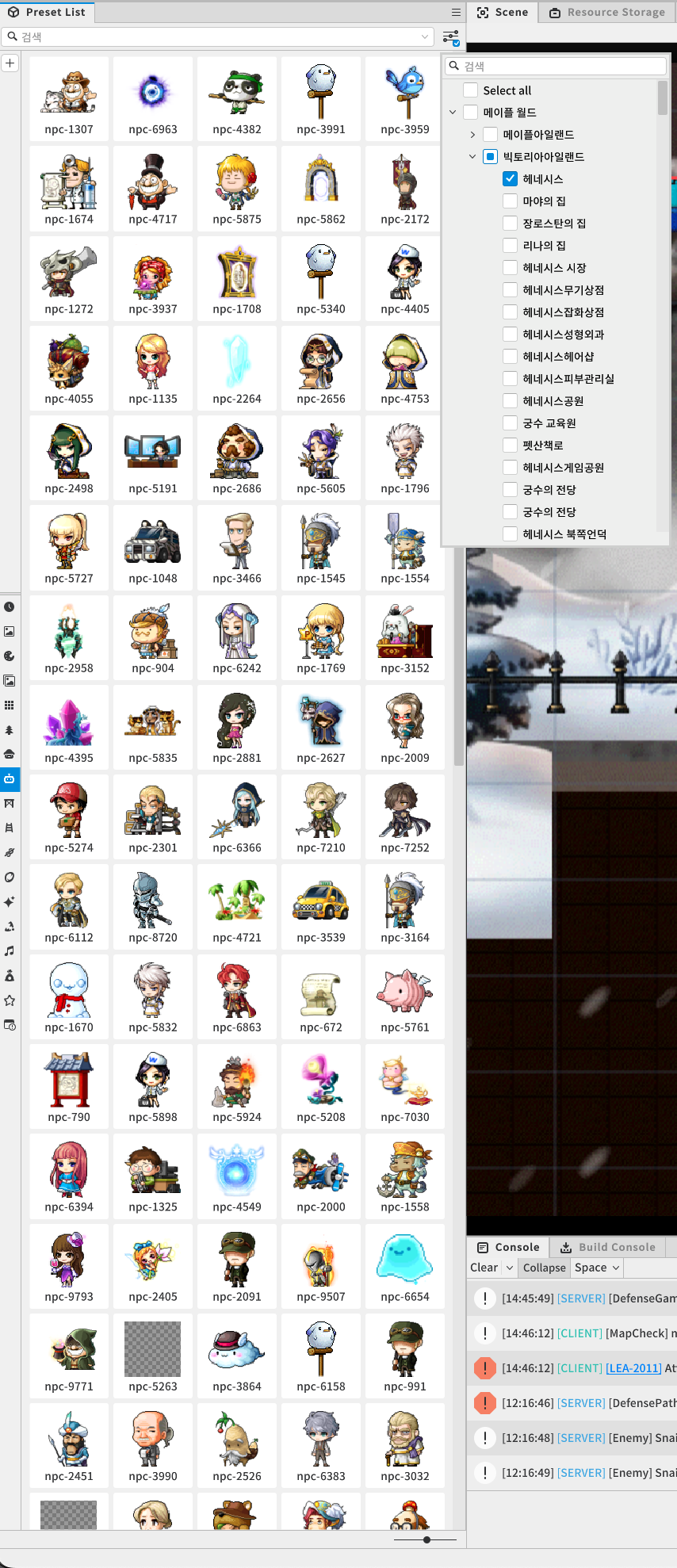
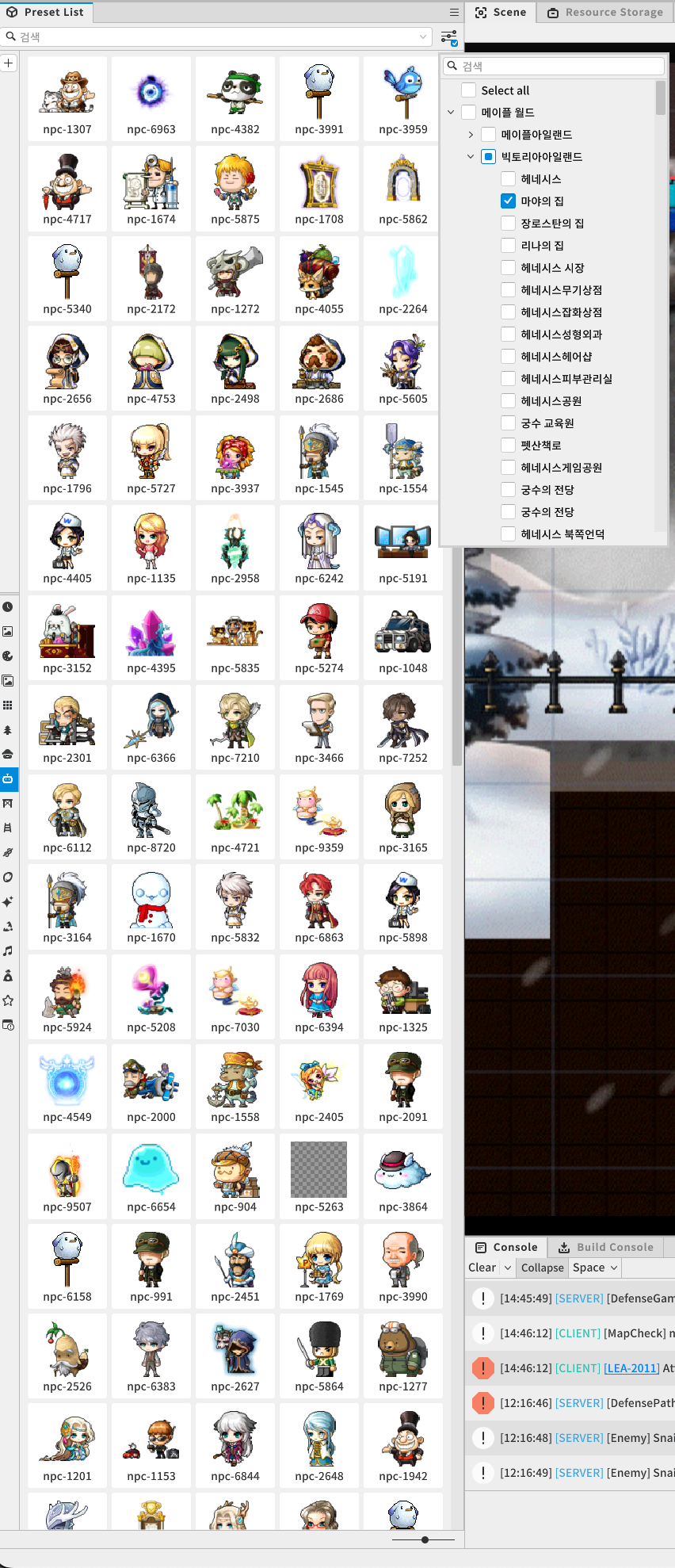
필터링이 제대로 작동하지 않는 모습
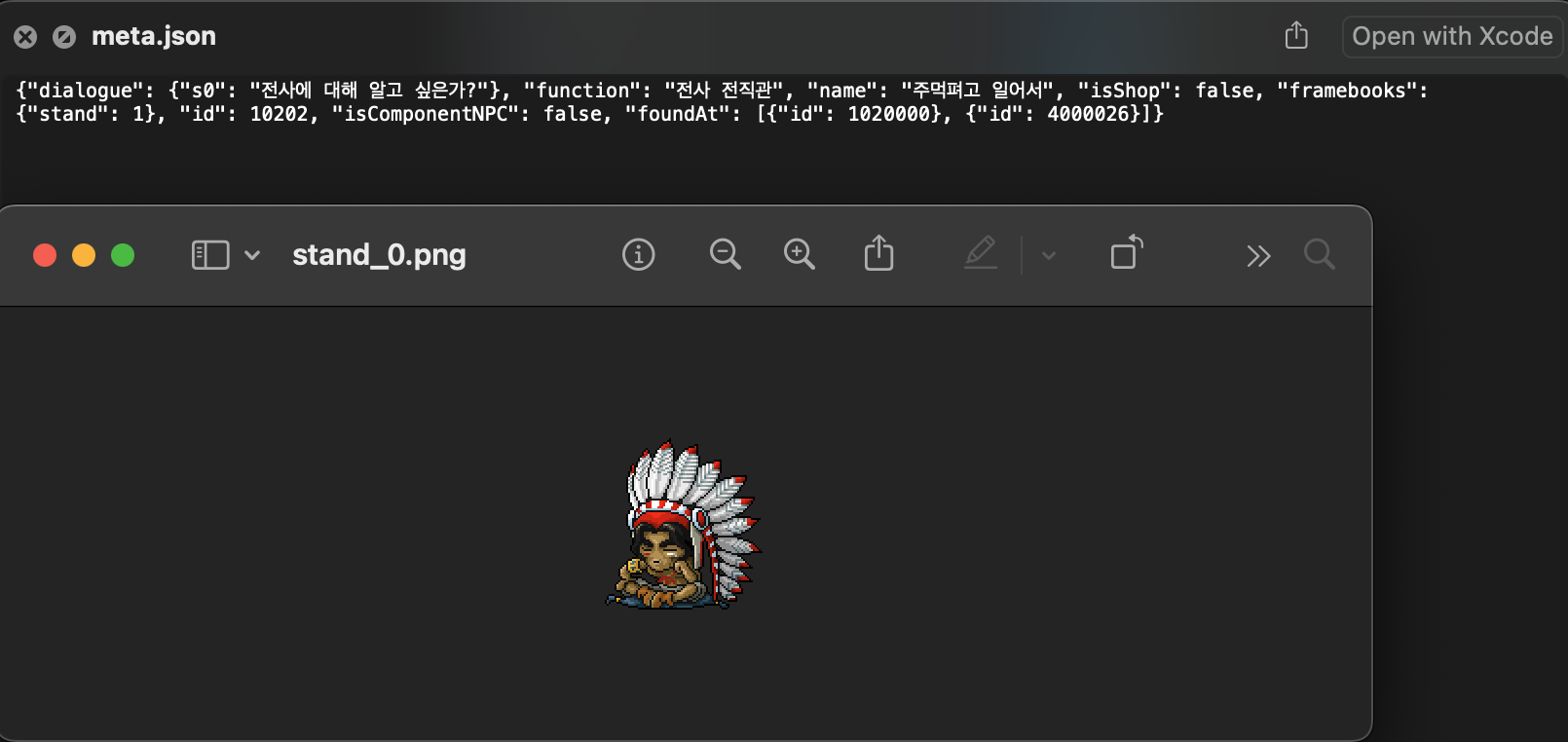
{"dialogue": {"s0": "전사에 대해 알고 싶은가?"}, "function": "전사 전직관", "name": "주먹펴고 일어서", "isShop": false, "framebooks": {"stand": 1}, "id": 10202, "isComponentNPC": false, "foundAt": [{"id": 1020000}, {"id": 4000026}]}이를 메이플에 특화된 캡셔닝 모델, 어노테이션 모델 등을 탐색하고 학습시켜 라벨링?
리소스를 받긴 했지만 난독화된 리소스일 것이기 때문에, 효율이 좋지 않거나 잘못된 문제를 풀 가능성이 높다고 판단.
- 절차적 생성 기법에 대한 이해 또는 경험이 있으신 분
근본적으로 레이어 각각을 받을 수 있으면 가능할 것 같은데, 현재는 뭉치이고, 유니티 엔진의 그래픽 generation을 잘 알지 못하기에 드랍.
영 감이 오지 않아서
쭉 메이플 게임을 진행했고
메이플 월드, 월드 크리에이팅도 진행했음.
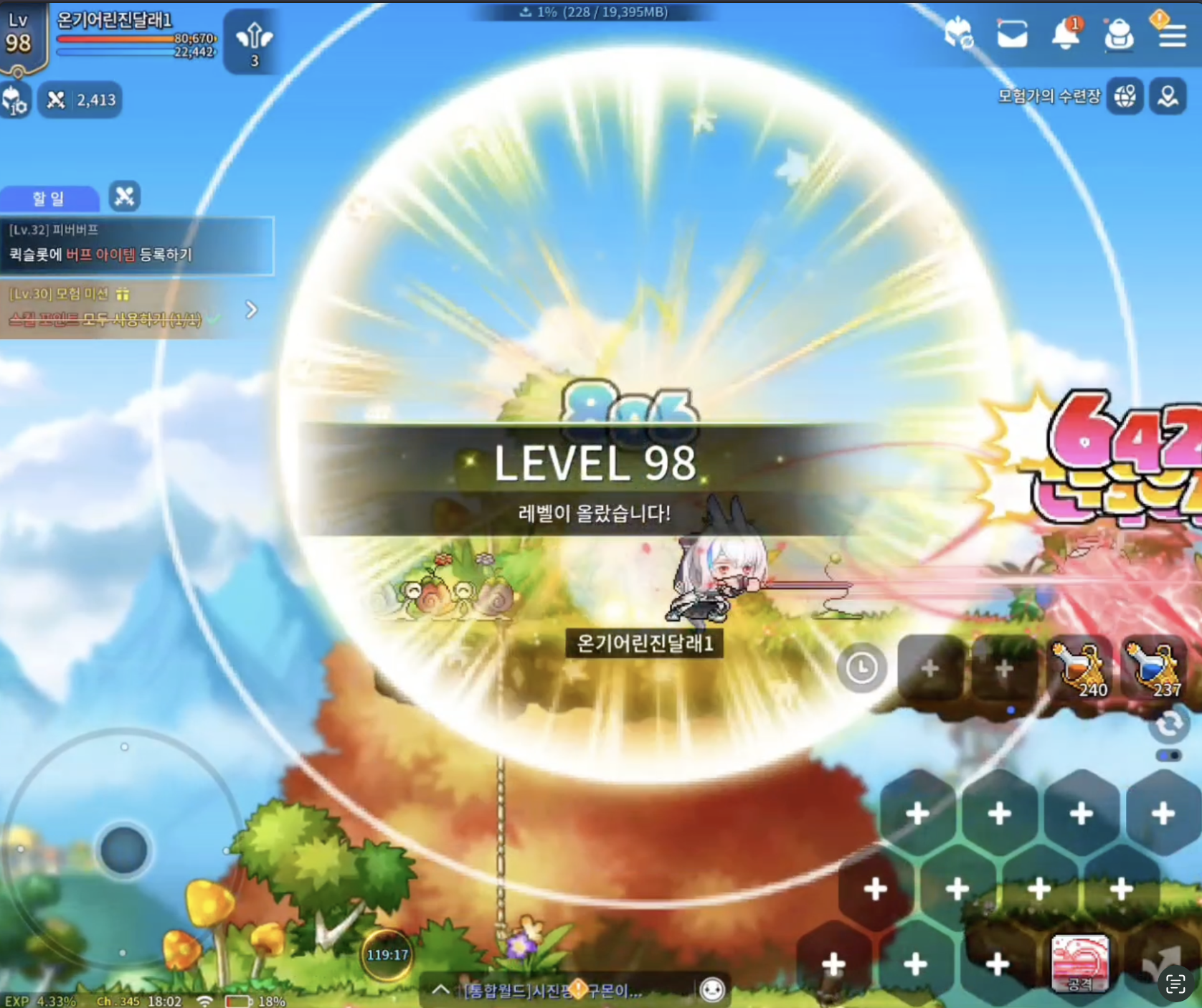
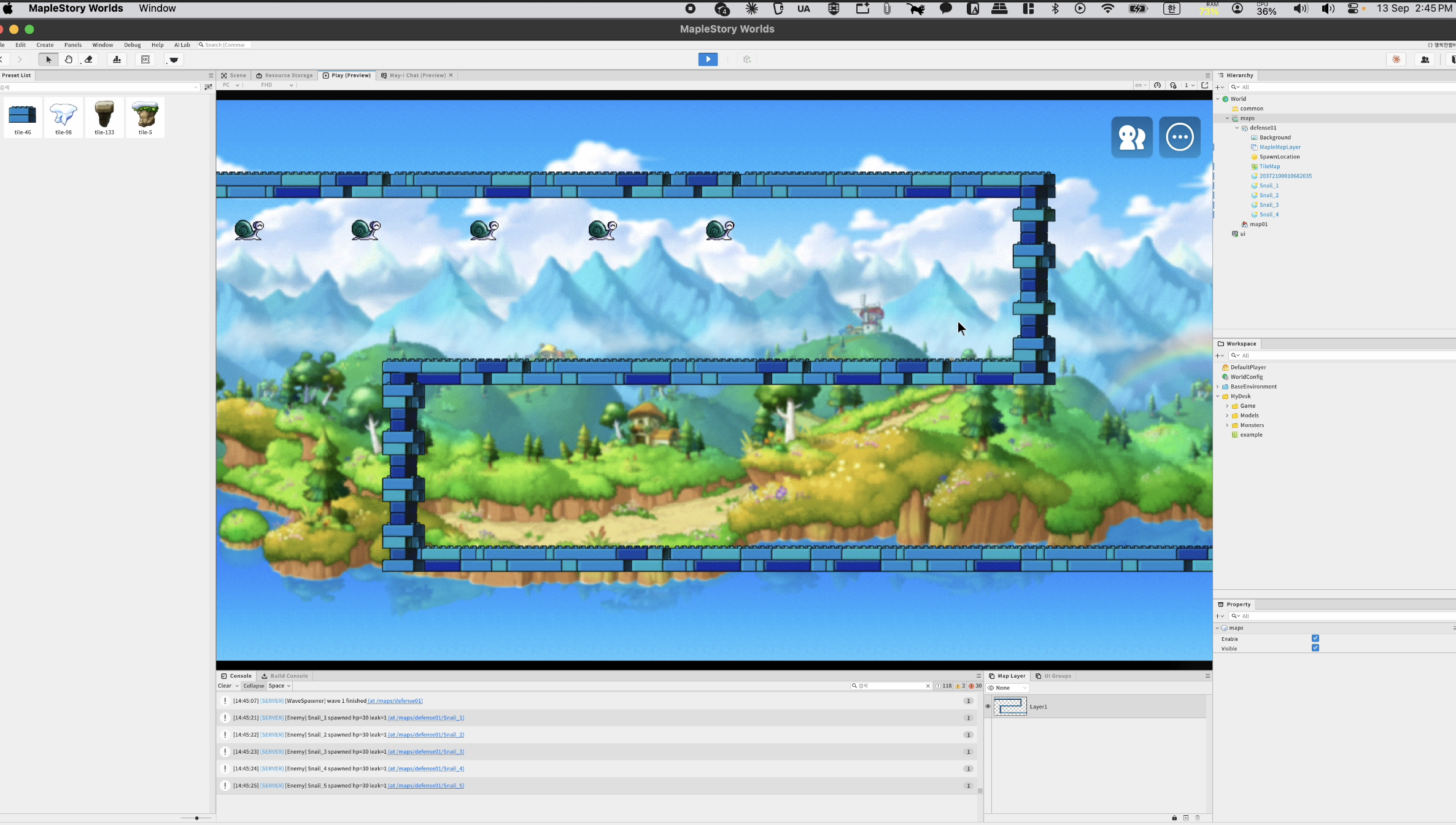
업스케일링 모델 개발로 정했습니다.
기존 연구 파악
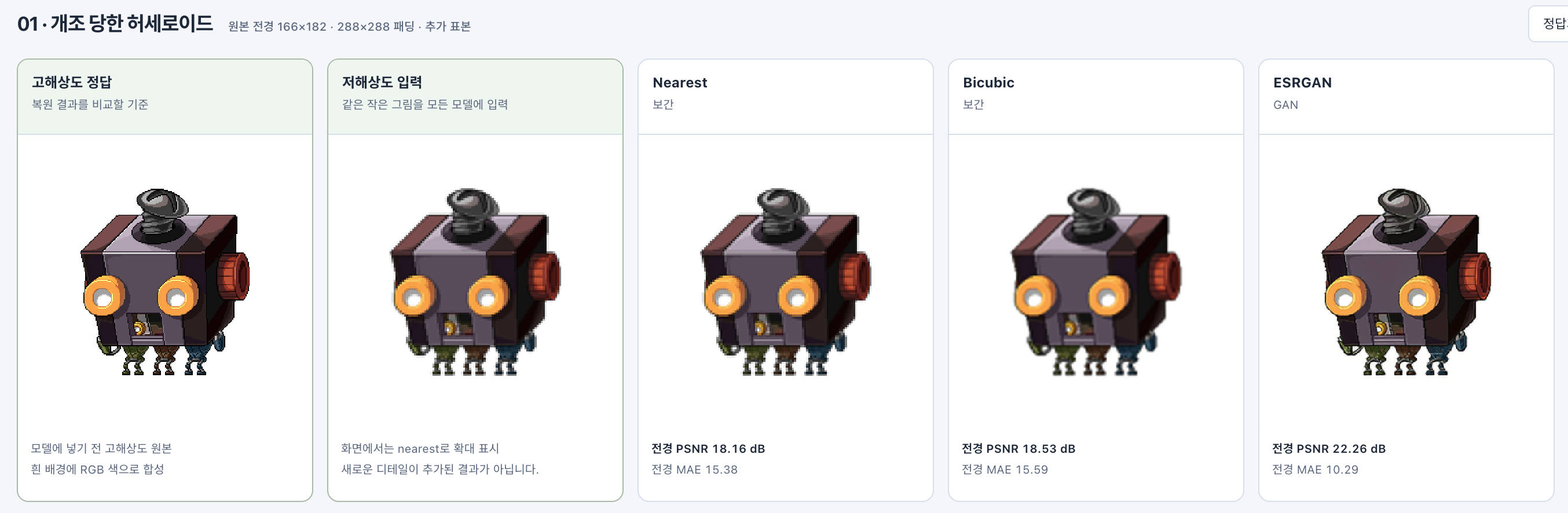
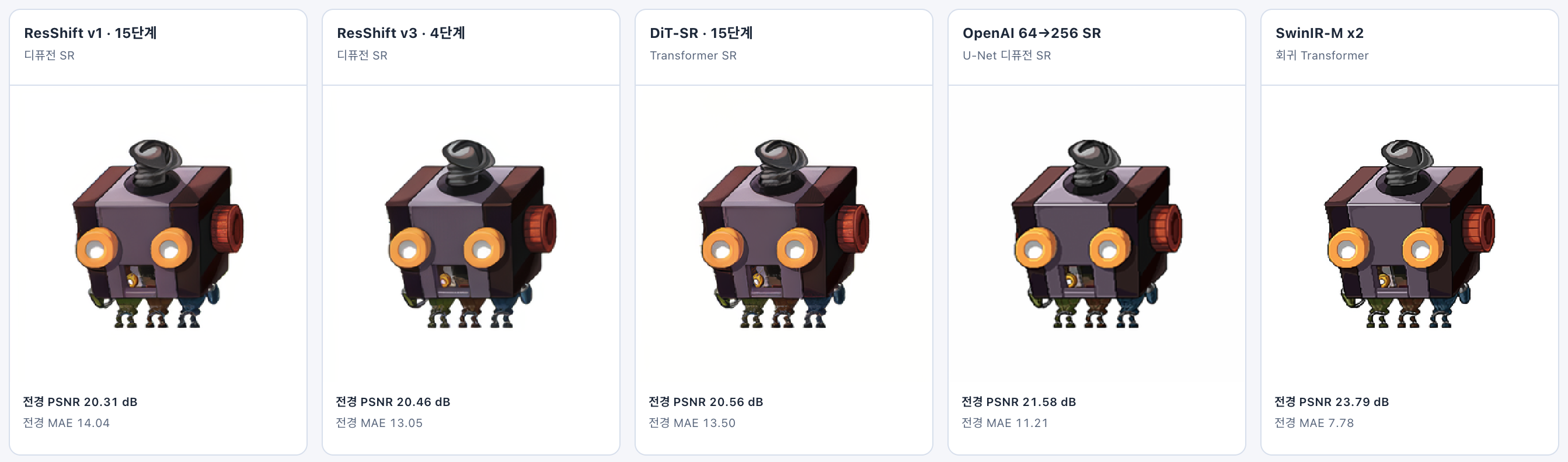
기존에 공개된 많은 모델들로 일단 우리 task에 적합한 모델을 찾아
cnn기반 gan, diffusion 기반 sr, 트랜스포머 기반 모델들 중
PSNR (정답과 추론 이미지 사이의 차이) 이 높고 MAE가 낮은 swin ir(트랜스포머) 모델을 채택하였습니다.
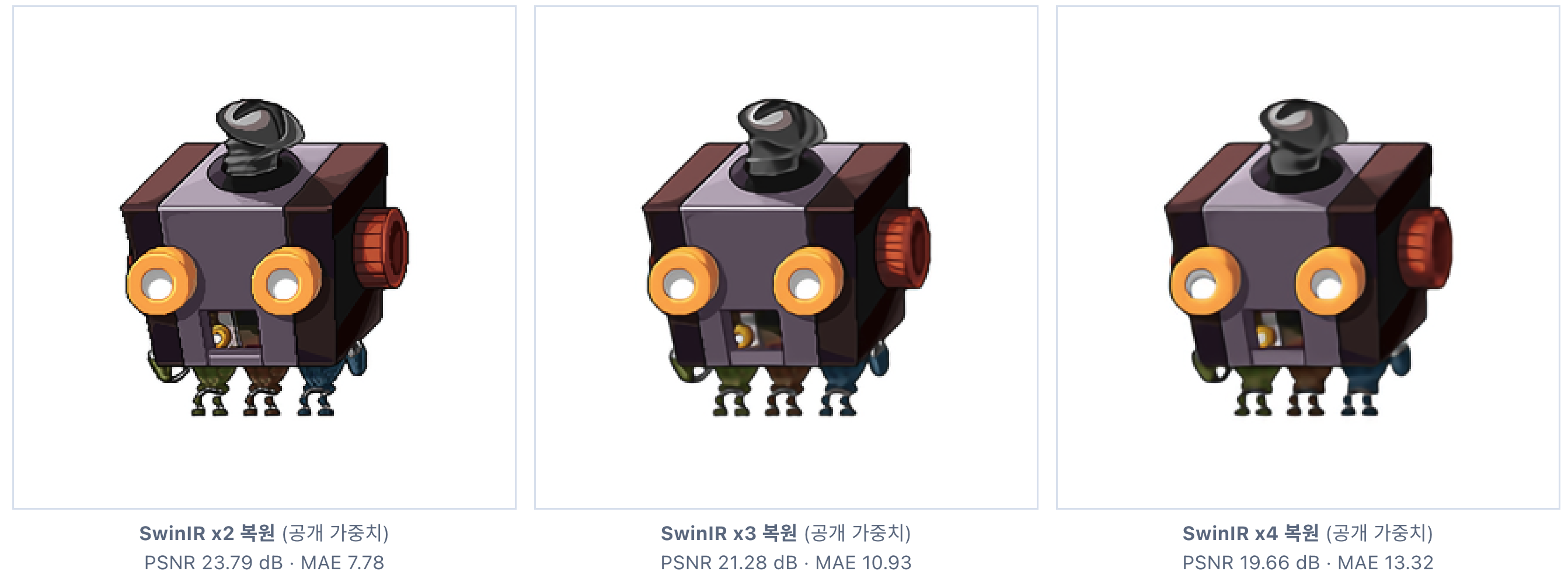
추가로 x2, x3, x4 중
x3부터 급격히 결과가 좋지 않아져서,
x2로 한정하였습니다.
데이터셋 설계 및 정제
타겟 데이터들이 100x100 미만 도트 데이터였기에,
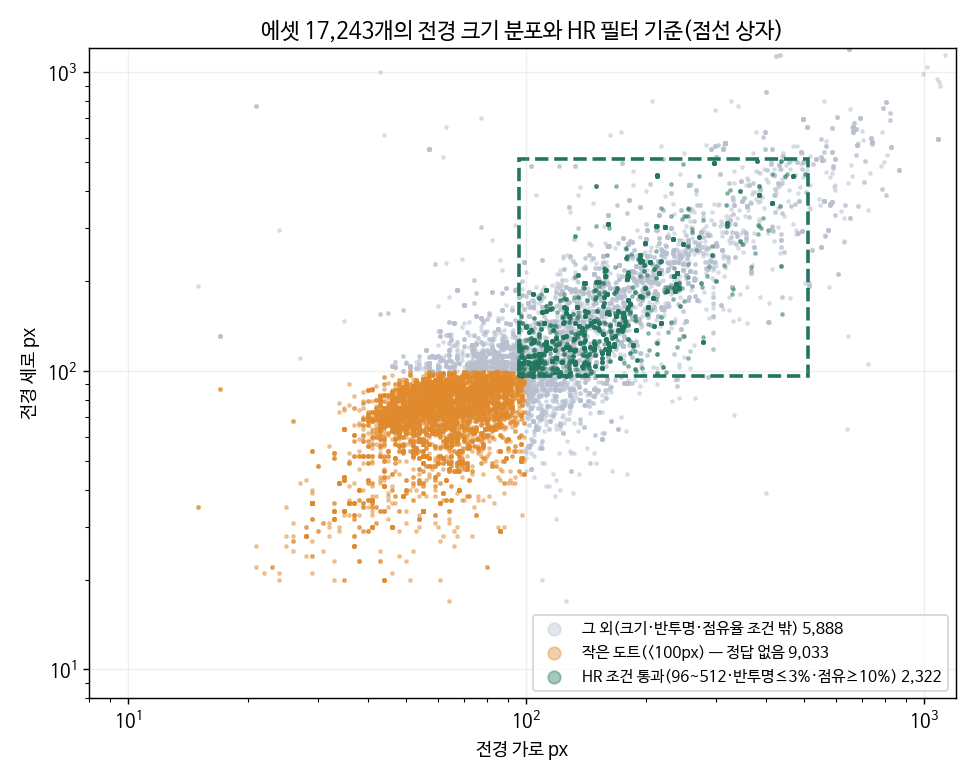
1/2 했을 때 100 근처가 되도록, 전경이 96~512px인 큰 도트에서 192×192를 잘라 정답(High Resolution, 이하 HR)으로 쓰고 그것을 절반(96×96)으로 줄인 것을 입력(Low Resolution, 이하 LR)으로 썼습니다.
1) 수집
maplestory.io 통한 다운로드. 약 2일 소요. (다시 한번 죄송합니다…)
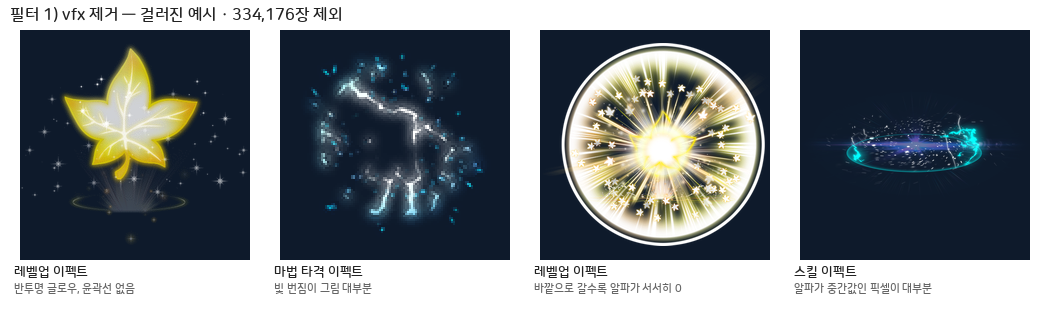
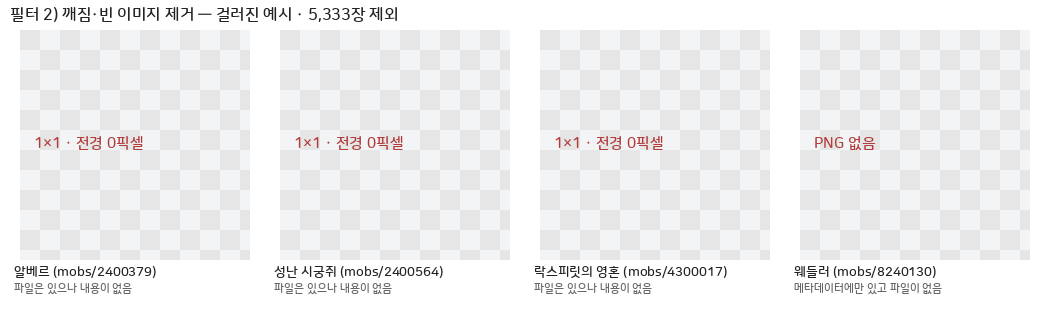
2) 필터링
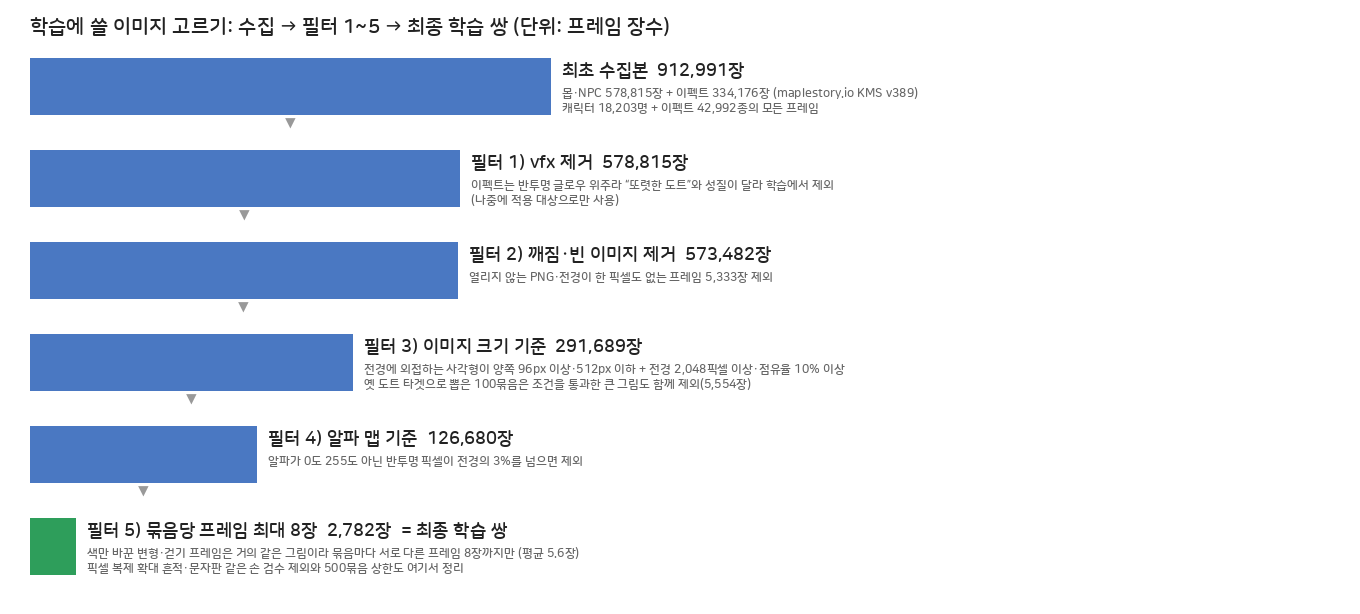
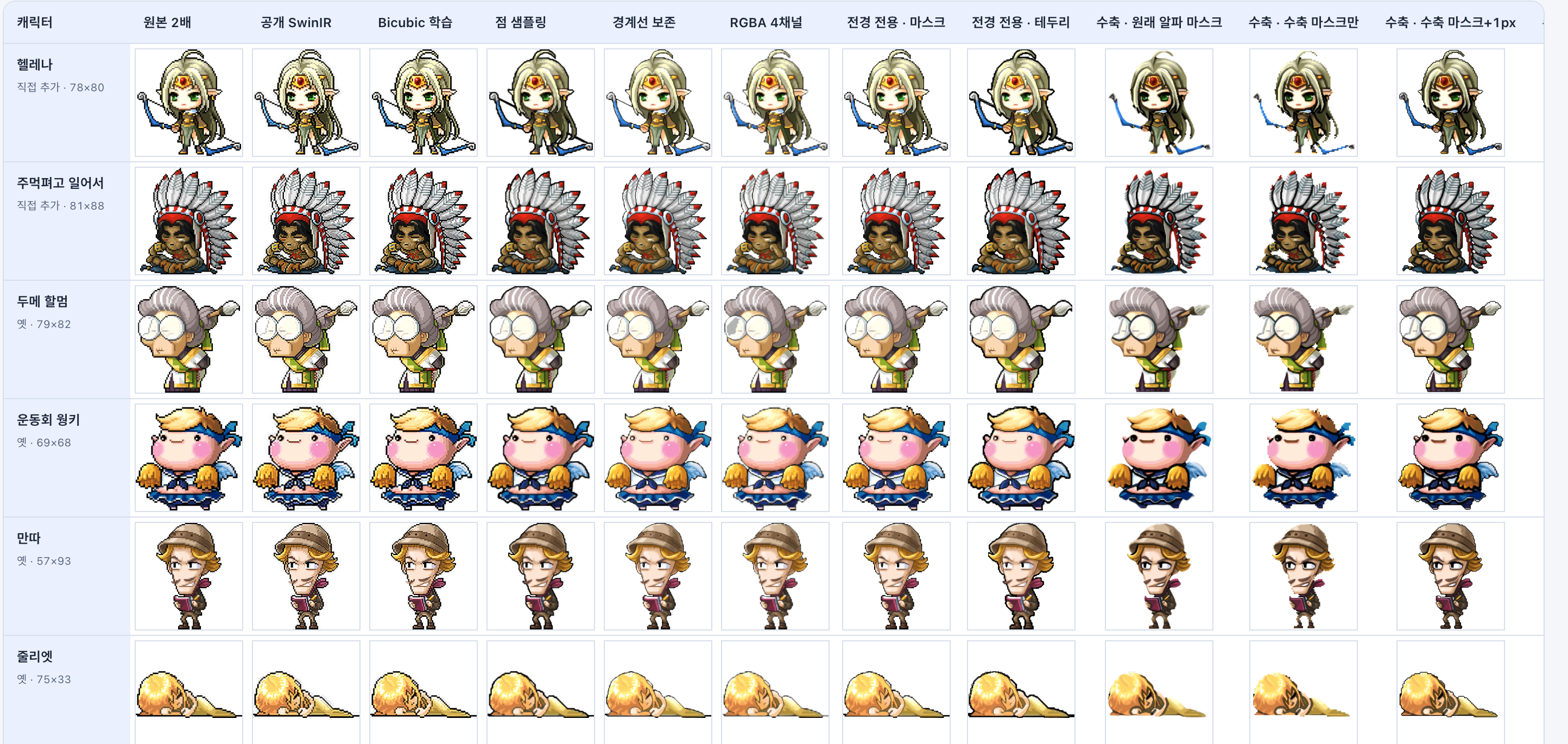
필터별로 실제 걸러진 이미지


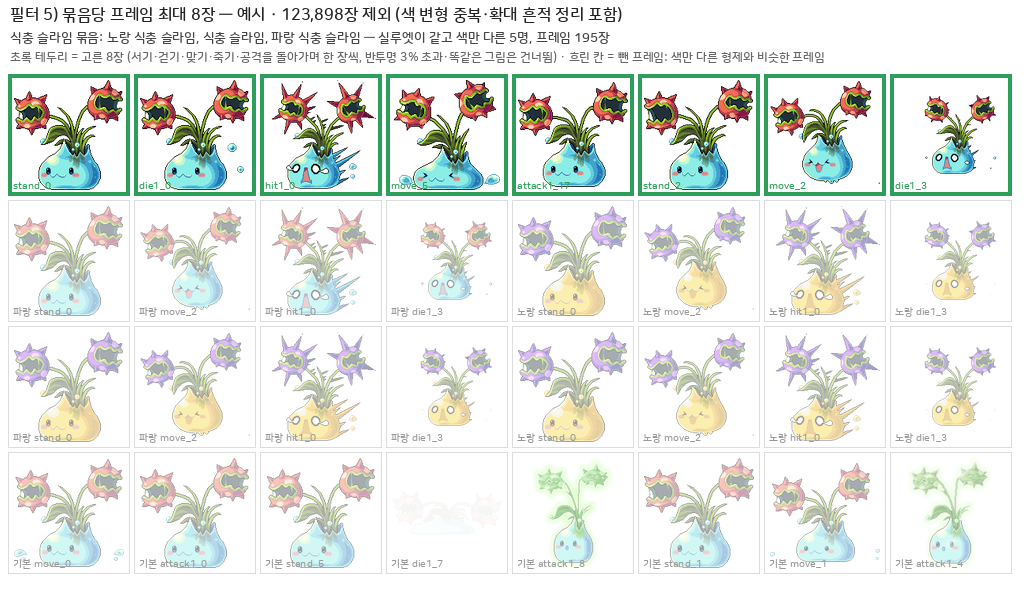
3) Train : Validation : Test = 8:1:1
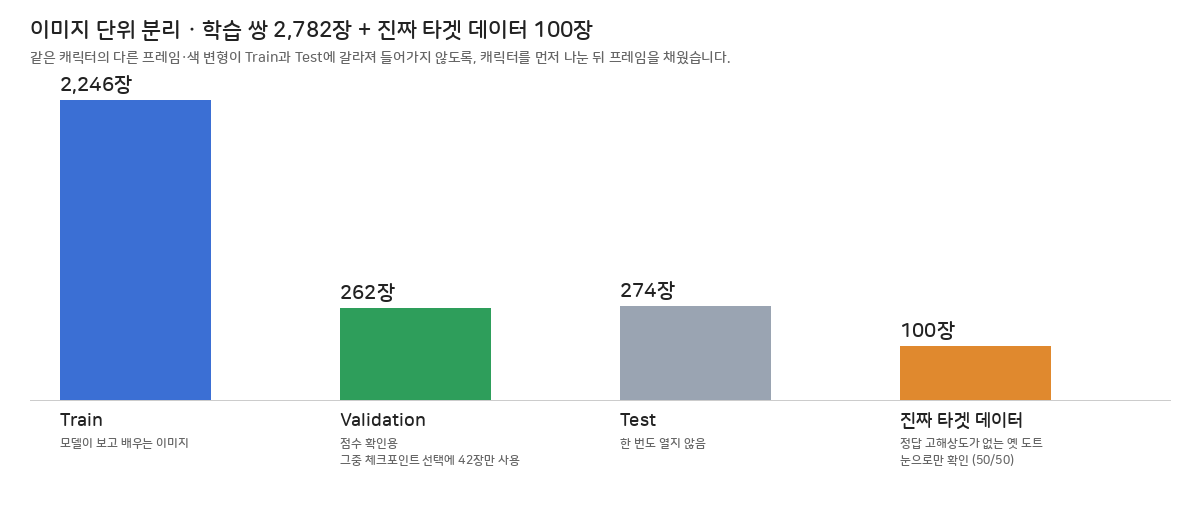
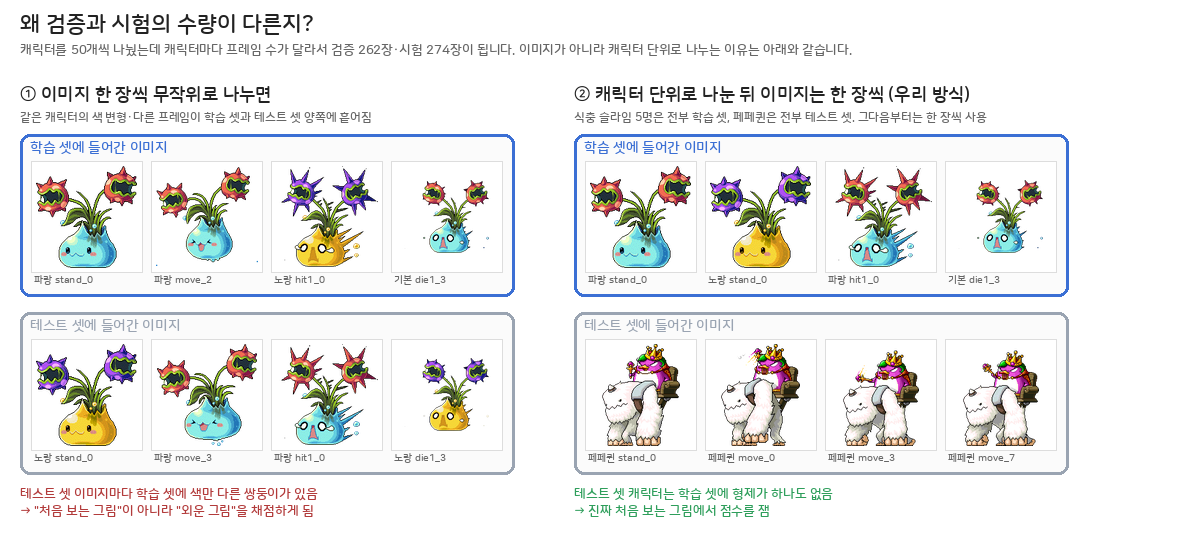
- 8:1:1인데 왜 262 : 274?
같은 캐릭터의 다른 프레임이나 색 변형이 학습과 평가에 갈라져 들어가면 “본 적 있는 그림”을 채점하는 셈이라, 캐릭터를 먼저 나눈 뒤 프레임을 채웠습니다.
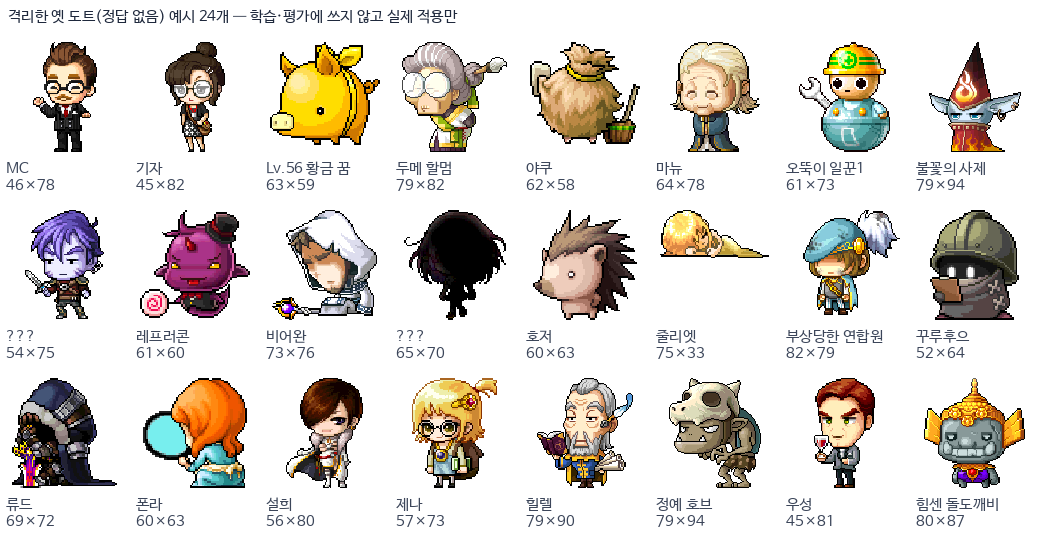
- 그리고 실제 테스트 셋은 다음과 같습니다. (HR이 없는 진짜 LR. 옛날 도트 그림)
4) 학습 쌍 만들기 (192 → 96), 큰 이미지들은 어떻게?
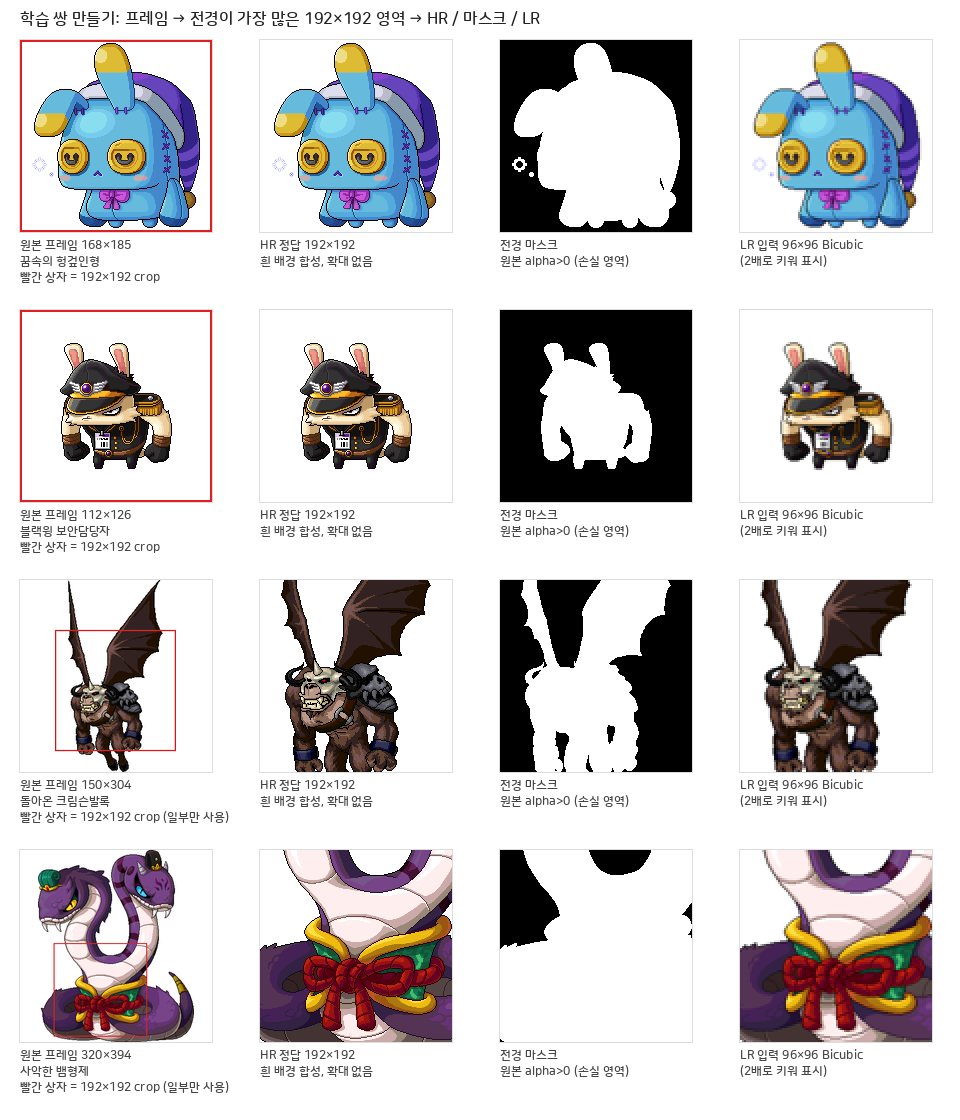
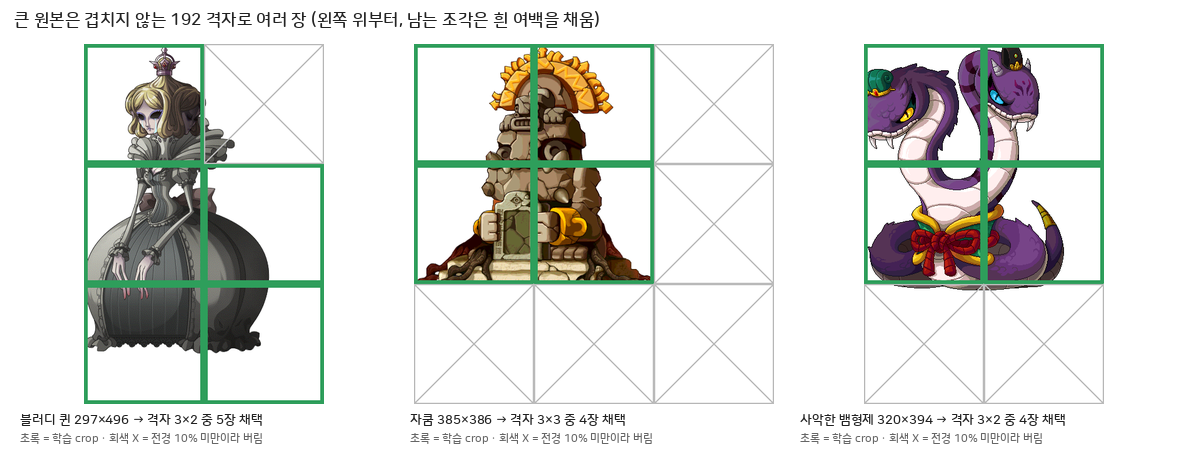
- 정답(HR): 프레임에서 192×192 영역 하나를 잘라냅니다. 만약 192보다 크다면 왼쪽 위부터 192 간격 격자로 여러 장, 단 슬라이딩 윈도우처럼 겹치는 부분은 없게. 남는 조각과 192보다 작은 쪽은 흰 여백을 채우기. 전경이 칸의 10% 미만인 칸은 버림. 큰 이미지 크롭시 위치정보(격자 행·열)도 저장.
- 입력(LR): 같은 HR 영역을 절반 96×96으로 줄입니다.
- 192인 이유: SwinIR이 8×8 창 단위라 8의 배수가 편하고, 2·3·4배 모두 정수(96·64·48)로 떨어지며, 배치 8이 GPU 메모리 안에 들어가는 크기 (AI 도움 받았습니다)
로스 함수 설계
기존 업스케일 모델들은
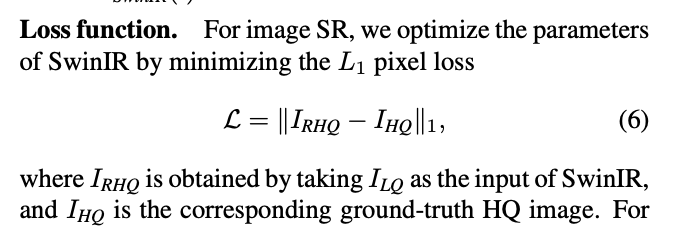
loss를 정답-추론의 픽셀 차이(L1)로 진행했음.
허나 현재 우리가 처리할 도트는 배경이 투명이라, 흰 배경으로 합성하면 그림 바깥이 전부 흰색이 됩니다. 이 부분은 맞추기 너무 쉬워서 loss 평균을 깎음.
그래서 정답 알파\>0인 전경 픽셀의 L1을 주로 보고, 배경 L1은 0.1배만 더한 가중 L1로 학습했습니다. 이미지에 알파를 곱하면 전경 배경 분리 가능.
(0.1은 그냥 AI가 준 답변인데… 파라미터 조절 ablation은 시간상 해보지 못했습니다)
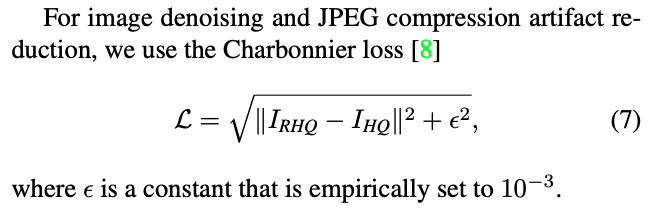
jpeg 아티팩트를 고려한 다른 loss함수가 있으나, (샤르보니에?)
우리의 경우 알파채널을 보관하는 png, 혹은 보존성을 생각하여 무압축포맷(png, tiff등)을 채택했을 것으로 생각,
고려하지 않았습니다.
(하지만 미묘하게 반투명 픽셀이 섞인 애셋은 있어서, 흰 배경 합성 시 색이 섞이지 않도록 반투명 3% 이상인 이미지는 사전에 필터하였습니다.)
학습은 너무 잘 진행됐습니다.
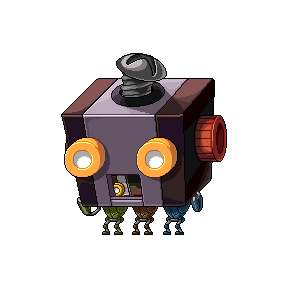
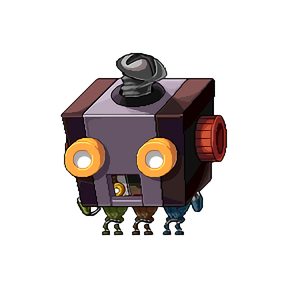
PSNR 23.79 dB · MAE 7.78
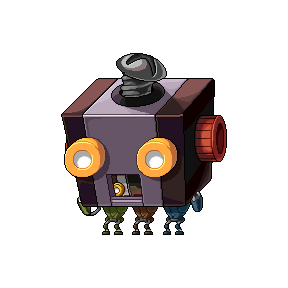
PSNR 27.80 dB · MAE 3.58
그런데 실제 옛날 도트에 넣어본 결과물은 달랐습니다.

swin ir 학습 전 이미지와 거의 차이가 없었으며, 기본적으로 엄청 샤픈을 먹인 이미지처럼 결과가 좋지 않았습니다.
그 이유를 저는 이미지를 줄이면서 bicubic 알고리즘이 이미지를 부드럽게 만들기 때문이라고 판단하였습니다.
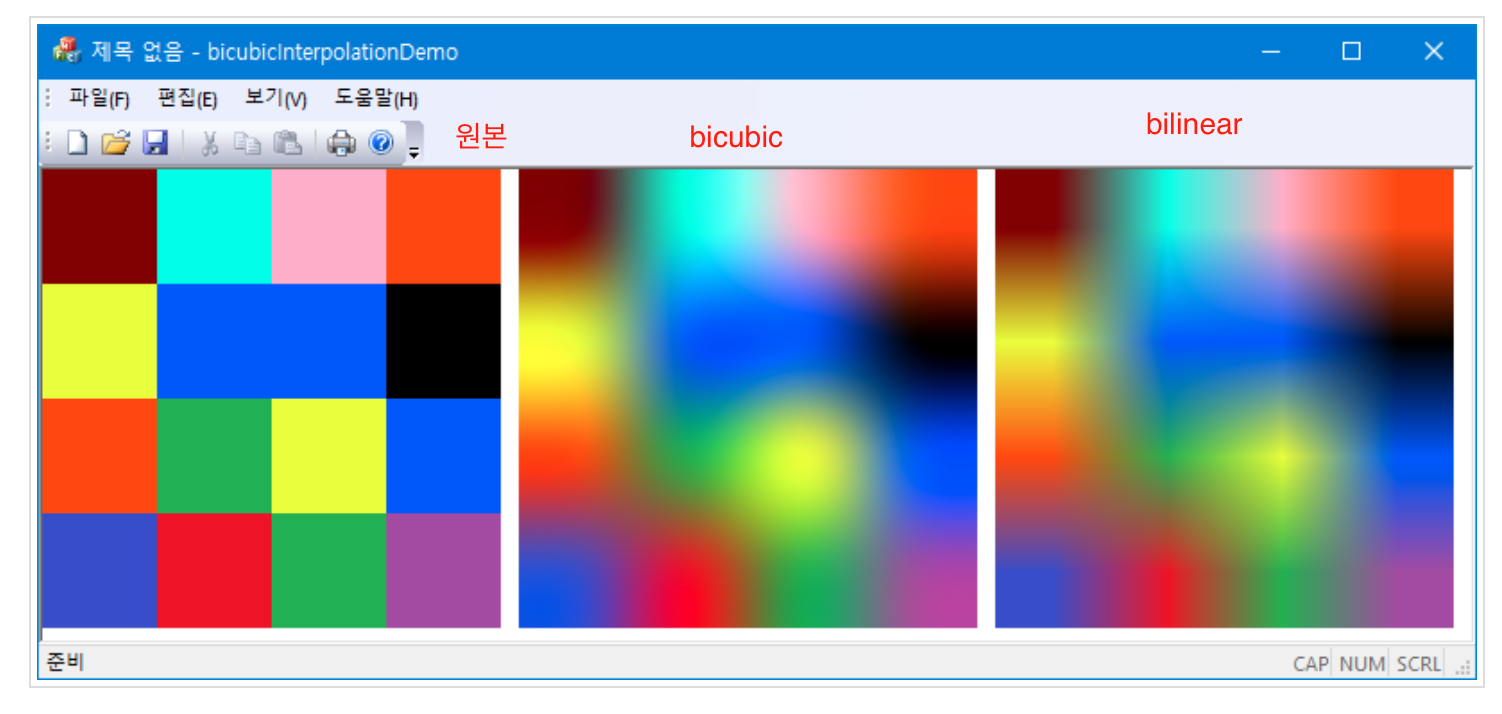
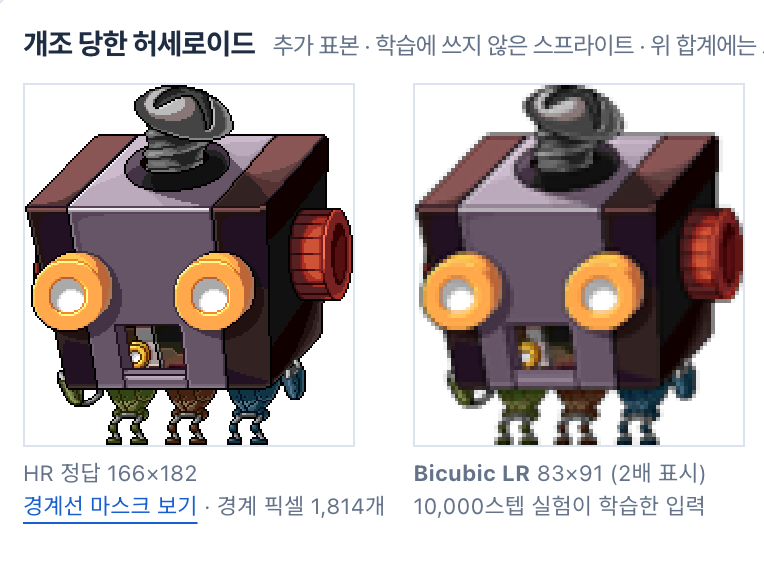
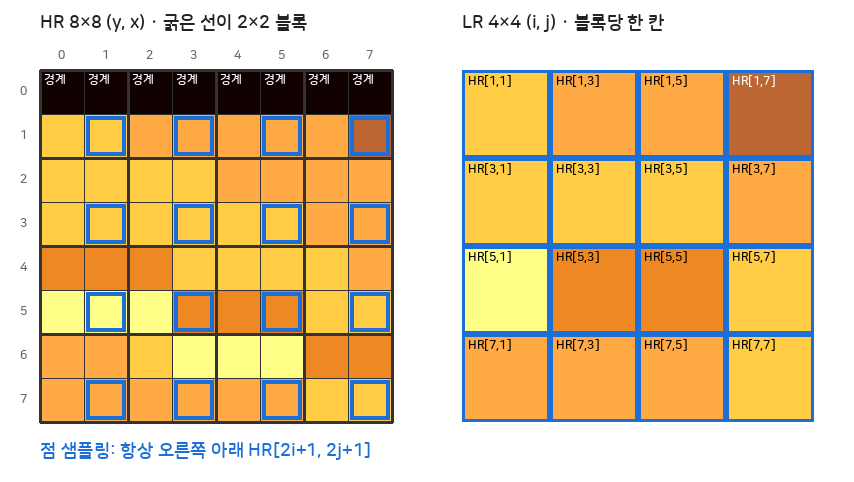
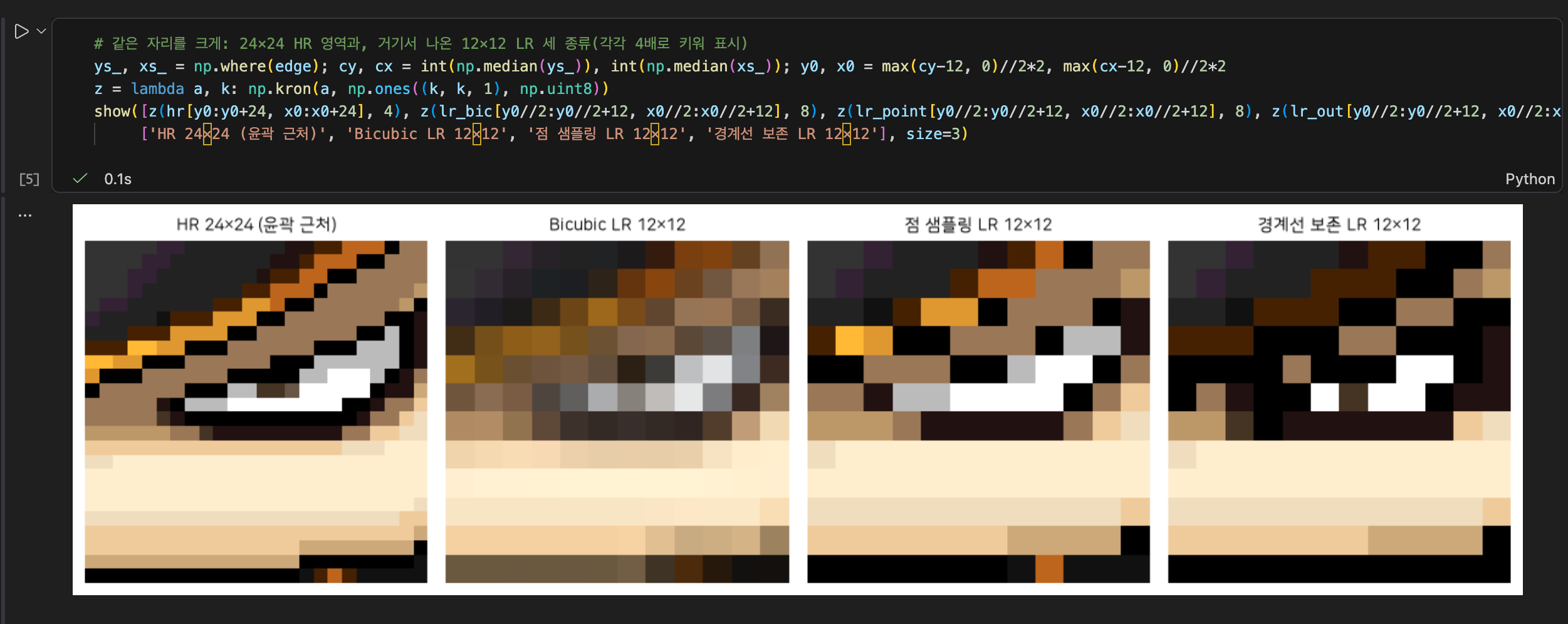
이에, 보간을 하지 않고 실제 High Resolution 이미지에서 한픽셀씩을 빼오는 [2i+1, 2j+1] 방식으로 이미지를 제작해서 학습을 돌렸고,
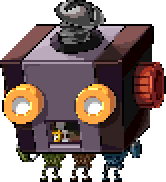
이렇게 한 결과, 검증 점수(캐릭터 42장 PSNR)는 16.1 dB로 Bicubic 학습본(24.3 dB)보다 낮게 나왔지만
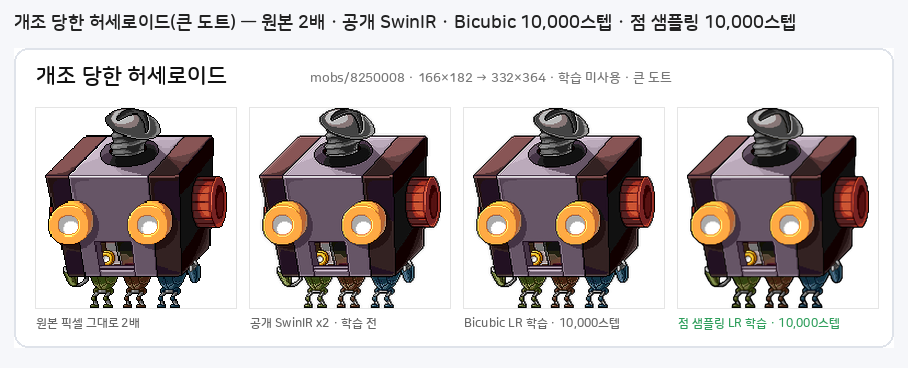

허나 엣지가 굵어지는 문제가 생겼고,
이는 loss를 줄이기 위해 검은색 칸을 남발하도록 학습 된 것이라 생각했습니다.
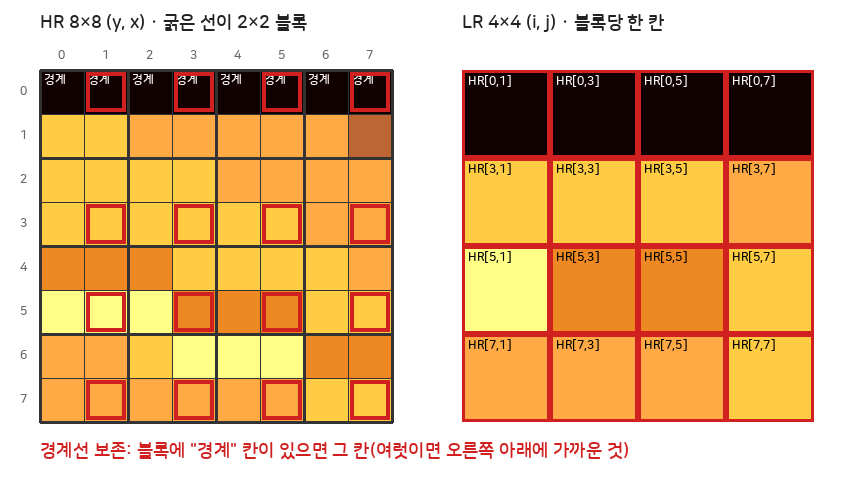
이후 경계선을 보존한 LR을 만드는 시도를 했고
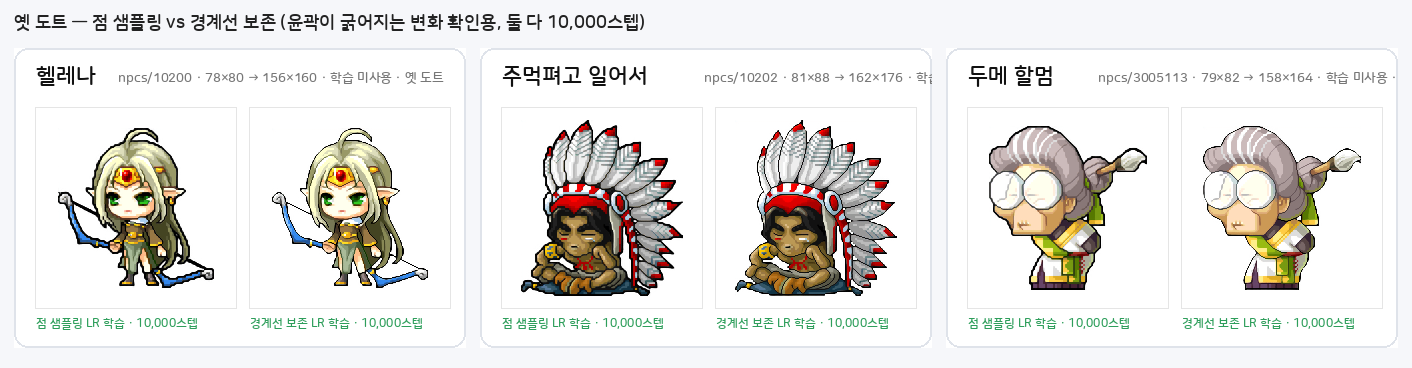
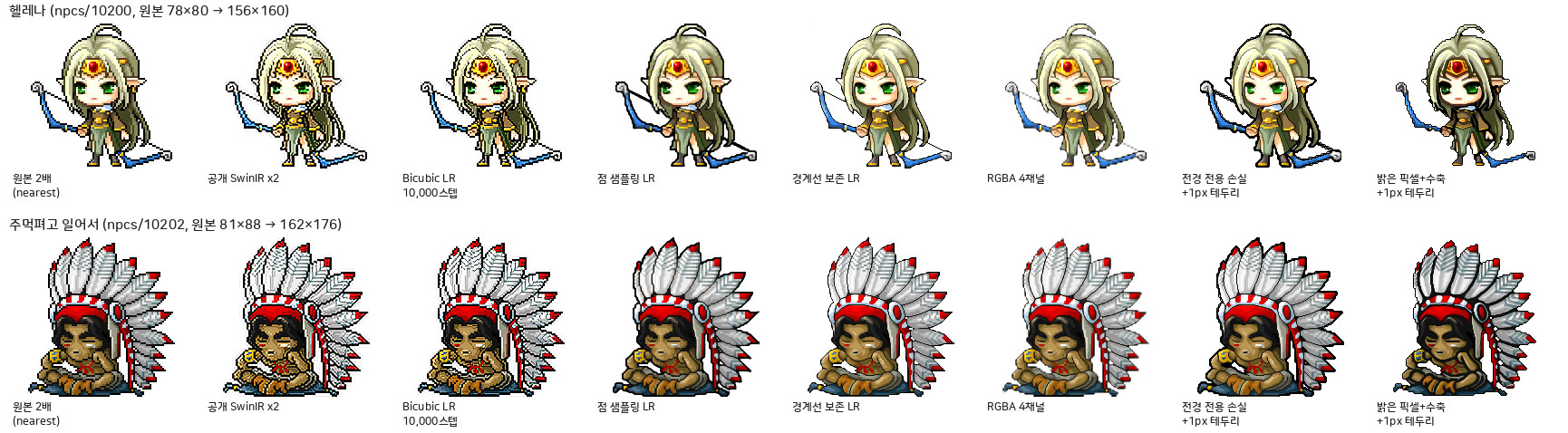
검은색 edge를 삭제하여 학습했다가, 마지막에 다시 1px outline을 그리는 방식(가장 밝은 픽셀 샘플링 + 알파 1px 수축),
배경을 아예 “없는 픽셀”로 두는 RGBA 4채널 학습(알파까지 한 번에 추론),
배경은 무시하고 전경×알파 차이만 보는 전경 전용 손실 등
여러가지 학습 데이터셋을 구성해서 실험해보았고,
그 결과 경계선 보존 LR이 가장 성능이 좋았음을 경험하였습니다.
학습
AI의 도움을 받았으나, 주피터 노트북을 별개로 만들어 사이 과정을 전체적으로 검수하였습니다.
학습 코드 전체 (펼치기) (최종 채택 경계선 보존 모델 기준)
1) 데이터 읽기
#data 뽑아오기
import hashlib
import json
from functools import lru_cache
from pathlib import Path

import numpy as np
import torch
from PIL import Image
from torch.utils.data import Dataset

ROOT = Path(__file__).resolve().parents[2]
DATA = ROOT / "data/swinir_finetune_v1"
PREPARATION = ROOT / "data/preparation_v1"


def digest(path):
    # 파일 바이트를 기준으로 캐시와 원본의 변경을 확인합니다.
    return hashlib.sha256(Path(path).read_bytes()).hexdigest()


def manifest_rows(scale, split, directory=DATA):
    # 학습용 경로는 train과 val만 열고 최종 시험 및 옛 도트는 차단합니다.
    if scale not in (2, 3, 4) or split not in ("train", "val"):
        raise ValueError("학습 데이터는 scale=2/3/4, split=train/val만 허용합니다.")
    directory = Path(directory)
    report = json.loads((directory / "summary.json").read_text())
    manifest = directory / "manifest.jsonl"
    assert report["status"] == "PASS" and digest(manifest) == report["manifest_sha256"]
    assert report["split_family_overlaps"] == report["crop_split_overlaps"] == 0
    return [row for line in manifest.read_text().splitlines()
            if (row := json.loads(line))["split"] == split]


class Patches(Dataset):
    # 동일한 HR에서 만든 세 배율의 LR을 모델별로 선택합니다.
    def __init__(self, scale, split="train", directory=DATA):
        self.scale, self.split, self.directory = scale, split, Path(directory)
        self.rows = manifest_rows(scale, split, directory)

    def __len__(self):
        # 프레임 수는 캐릭터별로 최대 여덟 장인 기존 분리를 따릅니다.
        return len(self.rows)

    @lru_cache(maxsize=256)
    def __getitem__(self, index):
        # PNG 해시와 크기를 확인한 뒤 RGB 및 전경 마스크를 [0,1]로 반환합니다.
        row = self.rows[index]
        result = {"index": index}
        for key, stored in (("lr", f"lr_x{self.scale}"), ("hr", "hr"), ("mask", "mask")):
            path = self.directory / row["files"][stored]
            assert digest(path) == row["sha256"][stored], f"캐시가 변경됐습니다: {path}"
            with Image.open(path) as image:
                raw = np.array(image.convert("L" if key == "mask" else "RGB"), copy=True)
            tensor = torch.from_numpy(raw).float().div_(255)
            result[key] = tensor.unsqueeze(0) if key == "mask" else tensor.permute(2, 0, 1)
        assert result["hr"].shape == (3, 192, 192) and result["mask"].shape == (1, 192, 192)
        assert result["lr"].shape == (3, 192 // self.scale, 192 // self.scale)
        return result
2) 학습 설정 (캐릭터 균등 추출 + 증강 + 전경 L1 + 0.1×배경 L1)
학습
from collections import defaultdict
import numpy as np
import torch
from torch.utils.data import DataLoader


class FamilyBatches:
    # 프레임이 많은 한 캐릭터가 학습을 지배하지 않게 캐릭터부터 뽑는다.
    def __init__(self, rows, config, start=0):
        # 단계 번호로 난수를 정하므로 중단 후에도 같은 순서를 재현한다.
        groups = defaultdict(list)
        for i, row in enumerate(rows):
            groups[row['family']].append(i)
        self.groups = [groups[k] for k in sorted(groups)]
        self.config, self.start = config, start

    def __iter__(self):
        # 끝이 정해진 배치만 만들고 선택한 캐릭터 안에서는 프레임을 균등 추출한다.
        for step in range(self.start, self.config['total_steps']):
            rng = np.random.default_rng(np.random.SeedSequence([self.config['data_seed'], step]))
            yield [int(rng.choice(self.groups[g])) for g in
                   rng.integers(len(self.groups), size=self.config['batch_size'])]


def loader(dataset, config, start=0):
    # CPU에서 PNG를 읽는 동안 GPU가 다음 배치를 처리할 수 있게 한다.
    return DataLoader(dataset, batch_sampler=FamilyBatches(dataset.rows, config, start),
                      num_workers=config['workers'], pin_memory=True,
                      generator=torch.Generator().manual_seed(config['data_seed']),
                      persistent_workers=config['workers'] > 0)


def augment(batch, step, seed):
		#증강
    # LR·HR·전경 마스크를 같은 방향으로 돌리며 RGB 색 자체는 바꾸지 않는다.
    rng = np.random.default_rng(np.random.SeedSequence([seed, step, 97]))
    turns, flip = int(rng.integers(4)), bool(rng.integers(2))
    values = {}
    for key in ('lr', 'hr', 'mask'):
        value = batch[key].to('cuda', non_blocking=True)
        value = torch.rot90(value, turns, (-2, -1))
        values[key] = value.flip(-1) if flip else value
    return values


def train_step(model, optimizer, batch, config, step):
		# 알파 곱해서 전경 배경 분리
    # 넓은 흰 여백보다 원본 도트의 픽셀 오차를 더 중요하게 줄인다.
    model.train()
    values = augment(batch, step, config['seed'])
    optimizer.zero_grad(set_to_none=True)
    prediction = model(values['lr'])
    error = (prediction-values['hr']).abs()
    mask = (values['mask'] > 0).float()
    foreground = (error*mask).sum()/(mask.sum()*3).clamp_min(1)
    background = (error*(1-mask)).sum()/((1-mask).sum()*3).clamp_min(1)
    # 로 스 함 수
    loss = foreground + 0.1*background
		# 로 스 함 수
    assert torch.isfinite(loss), 'non-finite training loss'
    loss.backward()
    norm = torch.nn.utils.clip_grad_norm_(model.parameters(), config['grad_clip'], error_if_nonfinite=True)
    optimizer.step()
    return dict(loss=float(loss.detach()), foreground_l1=float(foreground.detach()),
                background_l1=float(background.detach()), gradient_norm=float(norm))
3) 경계선 보존 점 샘플링
"""경계선 보존 점 샘플링: 2×2 블록 안에 어두운 경계 픽셀이 있으면 그 픽셀을 LR로 가져온다."""
import numpy as np

DARK = 70          # 평균 밝기(R+G+B)/3 가 이 값 이하이면 '어두운 픽셀' (실측: 검정·17단계 회색·어두운 갈색)
CONTRAST = 80      # 이웃과 밝기 차이가 이 값 이상이면 '경계'
#이건 AI 추천대로.

def outline_mask(rgba):
    # 어두운 픽셀 중 상하좌우 이웃에 훨씬 밝은 픽셀이나 투명 픽셀이 있는 것만 경계선으로 본다.
    rgb, alpha = rgba[..., :3].astype(np.int16), rgba[..., 3] > 0
    lum = rgb.sum(-1)//3
    dark = (lum <= DARK) & alpha
    pad = np.pad(lum, 1, constant_values=255); pada = np.pad(alpha, 1, constant_values=False)
    edge = np.zeros_like(dark)
    for dy, dx in ((0, 1), (0, -1), (1, 0), (-1, 0)):
        nl = pad[1+dy:1+dy+lum.shape[0], 1+dx:1+dx+lum.shape[1]]
        na = pada[1+dy:1+dy+lum.shape[0], 1+dx:1+dx+lum.shape[1]]
        edge |= (nl - lum >= CONTRAST) | ~na
    return dark & edge, dark, alpha, lum


def outline_sample(rgba, scale=2):
    # 블록마다 우선순위: 경계 픽셀 > 어두운 픽셀 > 불투명 픽셀 > 기본 위치 HR[2i+1,2j+1].
    # 같은 급이 여럿이면 기본 위치(오른쪽 아래)에 가장 가까운 것을 골라 출력 윤곽의 반 픽셀 흔들림을 줄인다.
    h, w = rgba.shape[0]//scale*scale, rgba.shape[1]//scale*scale
    rgba = rgba[:h, :w]
    edge, dark, alpha, lum = outline_mask(rgba)
    def blocks(x): return x.reshape(h//scale, scale, w//scale, scale, *x.shape[2:]).swapaxes(1, 2).reshape(h//scale, w//scale, scale*scale, *x.shape[2:])
    b_rgba, b_edge, b_dark, b_alpha, b_lum = (blocks(v) for v in (rgba, edge, dark, alpha, lum))
    default = scale*(scale//2) + scale//2                     # 2×2에서 인덱스 3 = (1,1)
    ys, xs = np.divmod(np.arange(scale*scale), scale)
    proximity = -(np.abs(ys - scale//2) + np.abs(xs - scale//2))            # 기본 위치와의 거리
    score = np.where(b_edge, 3000, 0) + np.where(b_dark, 2000, 0) + np.where(b_alpha, 1000, 0) + proximity*10
    choice = score.argmax(-1)
    lr = np.take_along_axis(b_rgba, choice[..., None, None], 2)[:, :, 0]
    stats = dict(hr_outline_pixels=int(edge.sum()), lr_outline_pixels=int(np.take_along_axis(b_edge, choice[..., None], 2).sum()),
                 blocks_with_outline=int(b_edge.any(-1).sum()), blocks_changed=int((choice != default).sum()), blocks=int(choice.size))
    return lr, stats


def point_lr_rgb(rgb, scale=2):
    # 비교용 기본 점 샘플링(HR[2i+1, 2j+1]).
    r = scale//2
    return rgb[r::scale, r::scale]
3-b) 경계선 보존 데이터셋 — OutlinePatches (캐시의 Bicubic LR 대신 투명 원본에서 3)의 outline_sample로 LR을 즉석에서 만든다. 4)의 학습이 쓰는 데이터셋)
"""경계선 보존 LR 데이터셋: 캐시의 투명 원본(rgba.png)에서 outline_sample로 LR을 만들어 흰 배경에 합성한다. 캐시 lr_x2.png(Bicubic)는 쓰지 않는다."""
import numpy as np
import torch
from PIL import Image

from experiments.swinir_finetune.data import Patches
from .outline import outline_sample


def white_rgb(rgba):
    # RGBA(uint8) → 흰 배경 합성 RGB(uint8). 학습 HR과 같은 규칙.
    a = rgba[..., 3:4].astype(np.float32)/255
    return (rgba[..., :3].astype(np.float32)*a + 255*(1-a)).round().astype(np.uint8)


class OutlinePatches(Patches):
    # 캐시 rgba.png에서 경계선 보존 LR을 만들고 흰 배경에 합성한다. hr·mask·분리 규칙은 그대로.
    def __getitem__(self, index):
        item = dict(super().__getitem__(index))
        rgba = np.asarray(Image.open(self.directory/self.rows[index]['files']['rgba']).convert('RGBA'))
        lr_rgba, _ = outline_sample(rgba, self.scale)
        item['lr'] = torch.from_numpy(white_rgb(lr_rgba)).float().div_(255).permute(2, 0, 1).contiguous()
        return item
4) 학습 실행 및 모델 저장 (run('outline') → VARIANTS['outline']['dataset']가 위 OutlinePatches)
"""x2를 경계선 보존 LR로 10,000스텝 학습(variant='outline'). 1,000스텝마다 가중치 저장과 전시 8종 추론."""
import fcntl
import gc
import hashlib
import json
import time

import torch

from experiments.public_models.multiscale.swinir import load_model
from experiments.swinir_finetune.artifacts import save_checkpoint, state, write_json
from experiments.swinir_finetune.learning import loader, train_step
from experiments.swinir_finetune.evaluate import select_monitor, evaluate_monitor
from experiments.swinir_long.settings import PRETRAINED, configuration as long_config
from experiments.swinir_finetune.settings import ROOT
from .display import evaluate_display
from .variants import VARIANTS
from pathlib import Path


def fingerprint(path):
    return hashlib.sha256(Path(path).read_bytes()).hexdigest()


def run(variant='outline', steps=10000):
    V = VARIANTS[variant]; OUT, CHECKPOINTS = V['out'], V['ckpt']
    # Bicubic 10,000스텝 실험과 같은 설정(손실·학습률·배치·FP32)에서 LR 생성 방식만 바꾼다.
    config = long_config(2, steps); config.update(downscale=V['downscale'], lr_source='computed from cache', variant=variant)
    checkpoint = PRETRAINED/'weights'/config['pretrained']
    resume = None
    if (OUT/'state.json').exists():
        # 중단된 실행은 last.pth(가중치+옵티마이저+스케줄러)에서 이어 간다. 그 외 기존 실행은 덮어쓰지 않는다.
        previous = json.loads((OUT/'state.json').read_text())
        if previous.get('status') != 'stopped':
            raise RuntimeError(f'Existing run: {OUT}')
        resume = torch.load(CHECKPOINTS/'last.pth', map_location='cpu', weights_only=False)
        print('RESUME from step', resume['step'], flush=True)
    torch.set_num_threads(4); torch.manual_seed(config['seed'])
    torch.backends.cuda.matmul.allow_tf32 = torch.backends.cudnn.allow_tf32 = False
    torch.set_float32_matmul_precision('highest')
    train, val = V['dataset'](2, 'train'), V['dataset'](2, 'val')
    selection = select_monitor(val, max_families=42)
    write_json(OUT/'monitor_selection.json', selection)
    model, count = load_model(2, checkpoint)
    report = dict(status='preparing', step=0, config=config, history=[], evaluations=[], milestones=[],
                  checkpoint=str(checkpoint), checkpoint_sha256=fingerprint(checkpoint), strict_tensors=count,
                  data_manifest_sha256=fingerprint(train.directory/'manifest.jsonl'), best_step=0, best_psnr=None,
                  training_seconds=0., test_used=False)
    if resume:
        report = previous; report.pop('note', None); report.pop('stopped_at_step', None)
        report['step'] = resume['step']; report['history'] = [h for h in report['history'] if h['step'] <= resume['step']]
        report['resumed_from'] = resume['step']; model.load_state_dict(resume['params'], strict=True)
    state(OUT/'state.json', report)

    def milestone(step, path):
        result = evaluate_display(model, OUT/f'step_{step:05d}', path, lr_fn=V['display_lr'])
        report['milestones'].append(dict(step=step, checkpoint=str(path), checkpoint_sha256=fingerprint(path),
                                         psnr=result['aggregate']['psnr'], mae=result['aggregate']['mae']))
        print('MILESTONE', step, f"display8 PSNR={result['aggregate']['psnr']:.2f}", flush=True)
    try:
        with open('/tmp/maple-public-models-gpu.lock', 'w') as lock:
            fcntl.flock(lock, fcntl.LOCK_EX)
            model.cuda()
            optimizer = torch.optim.Adam(model.parameters(), lr=config['learning_rate'], betas=config['betas'])
            scheduler = torch.optim.lr_scheduler.CosineAnnealingLR(optimizer, config['total_steps'], eta_min=config['min_learning_rate'])
            if resume:
                optimizer.load_state_dict(resume['optimizer']); scheduler.load_state_dict(resume['scheduler'])
            else:
                baseline = evaluate_monitor(model, val, selection, 2)
                report['best_psnr'] = baseline['aggregate']['psnr']; report['evaluations'].append(dict(step=0, **baseline))
                save_checkpoint(CHECKPOINTS/'best.pth', model, optimizer, scheduler, report)
                milestone(0, checkpoint)
            state(OUT/'state.json', report, status='training')
            start_step = resume['step'] if resume else 0
            for step, batch in enumerate(loader(train, config, start=start_step), start=start_step+1):
                torch.cuda.synchronize(); start = time.perf_counter()
                metrics = train_step(model, optimizer, batch, config, step-1); scheduler.step()
                torch.cuda.synchronize(); report['training_seconds'] += time.perf_counter()-start; report['step'] = step
                if step == 1 or step % config['log_interval'] == 0:
                    report['history'].append(dict(step=step, seconds=report['training_seconds'], learning_rate=optimizer.param_groups[0]['lr'], **metrics))
                    state(OUT/'state.json', report, peak_gpu_gib=torch.cuda.max_memory_allocated()/2**30)
                if step % config['eval_interval'] == 0 or step == config['total_steps']:
                    measured = evaluate_monitor(model, val, selection, 2); report['evaluations'].append(dict(step=step, **measured))
                    score = measured['aggregate']['psnr']
                    if score > report['best_psnr']:
                        report.update(best_psnr=score, best_step=step); save_checkpoint(CHECKPOINTS/'best.pth', model, optimizer, scheduler, report)
                    save_checkpoint(CHECKPOINTS/'last.pth', model, optimizer, scheduler, report)
                    print('VAL', step, f'{score:.3f}', 'BEST', report['best_step'], flush=True)
                if step % config['milestone_interval'] == 0:
                    path = CHECKPOINTS/f'step_{step:05d}.pth'; save_checkpoint(path, model, optimizer, scheduler, report)
                    milestone(step, path); state(OUT/'state.json', report)
            model.cpu(); del model, optimizer, scheduler; gc.collect(); torch.cuda.empty_cache()
            state(OUT/'state.json', report, status='complete', selected_step=report['best_step'],
                  selected_checkpoint=str(CHECKPOINTS/'best.pth'), selected_sha256=fingerprint(CHECKPOINTS/'best.pth'))
    except BaseException as error:
        state(OUT/'state.json', report, status='failed', error=f'{type(error).__name__}: {error}'); raise


if __name__ == '__main__':
    import sys
    run(sys.argv[1] if len(sys.argv) > 1 else 'outline')
설정값:
배치 8 · Adam(0.9, 0.99) · 학습률 2e-5 → 2e-6 cosine · grad clip 1.0 · FP32(TF32 끔) · HR 192 패치 · 10,000스텝 · 시드 20260912.
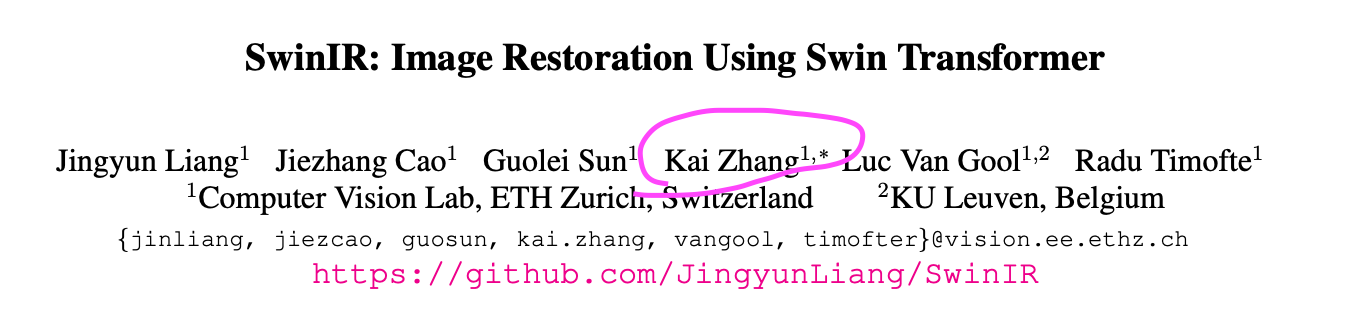
증강 종류 (공저자 Kai Hwang의 코드 참고. 깃허브)

다시 한번 결과물 보기
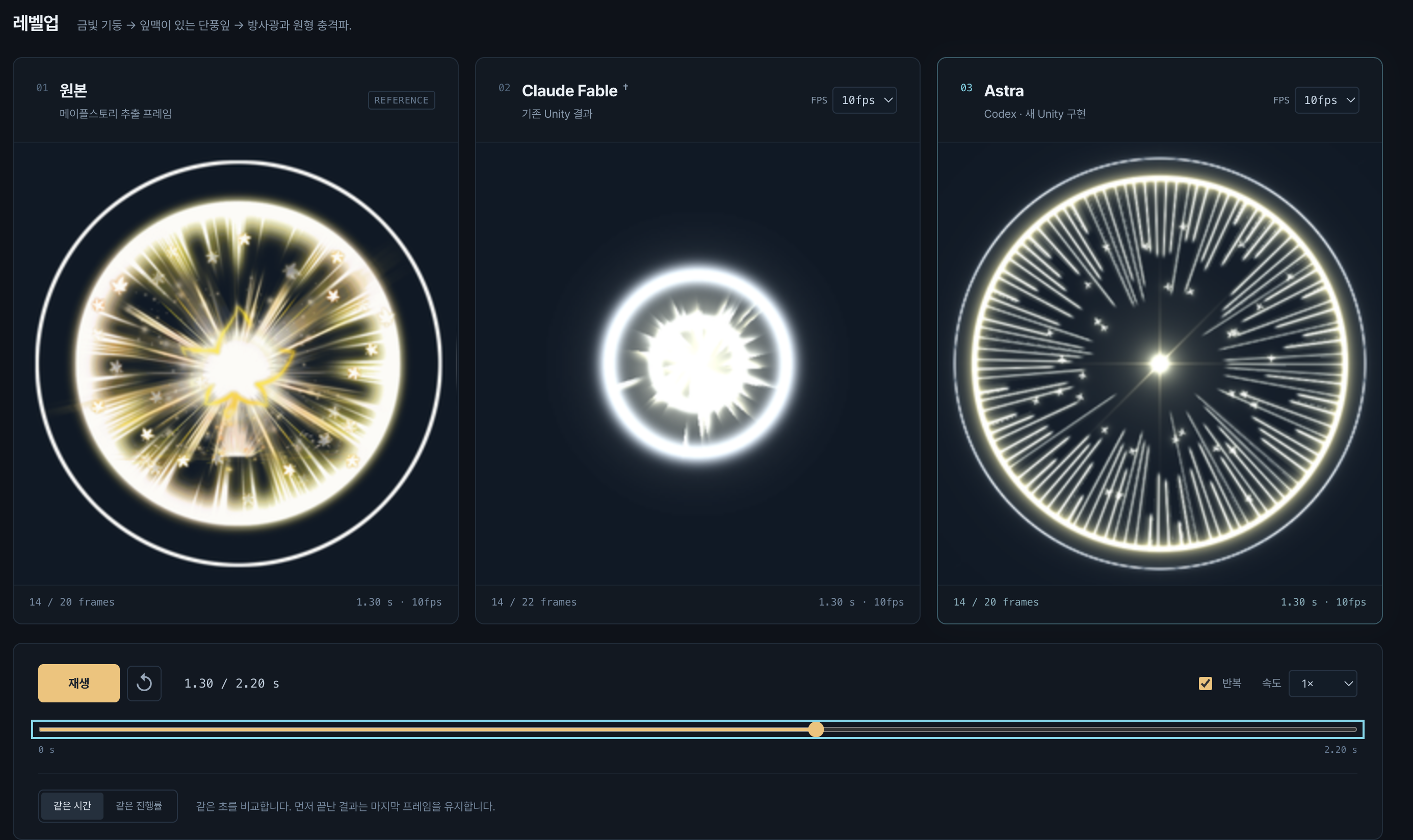
추가 실험) vfx에 적용한다면?
vfx에도 적용했는데,
HR이 존재하지 않아 수치는 측정할 수 없으나, 정성적으로 평가했을때 공개된 Swin IR 모델과 bicubic 10000스텝이 가장 자연스러웠습니다.
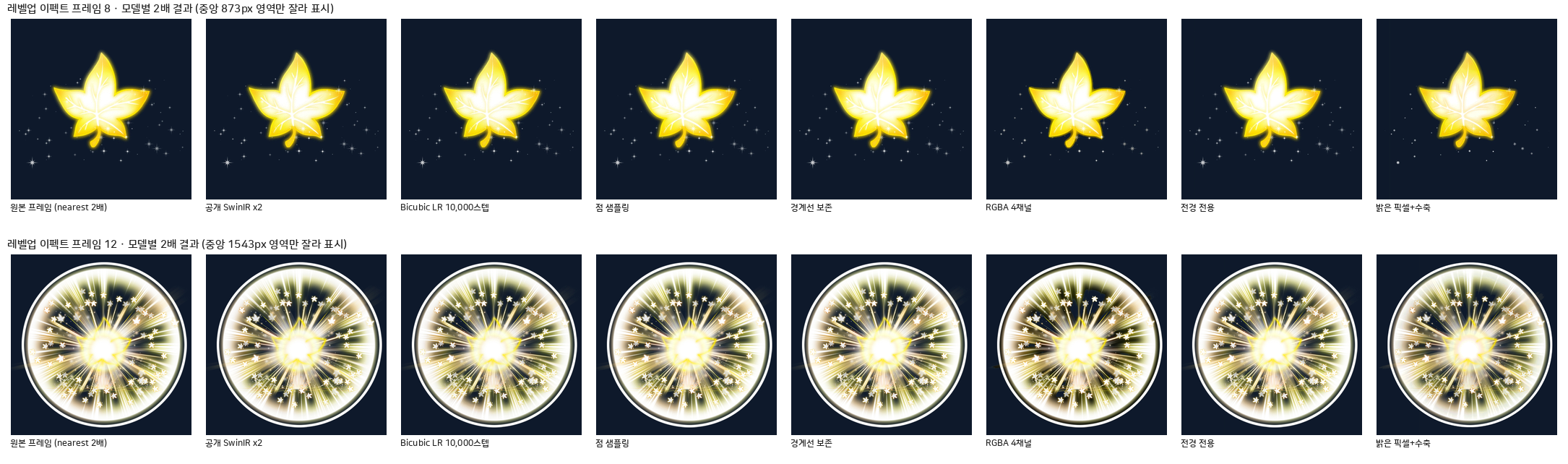
이펙트 6종 × 모델 비교(동기 재생 · 프레임별 보기)
이 건은 vfx만 모아서 다시 데이터를 정제하여 학습을 해야 할 것으로 보입니다.
회고, 여전한 한계
1) 엣지 앨리어싱
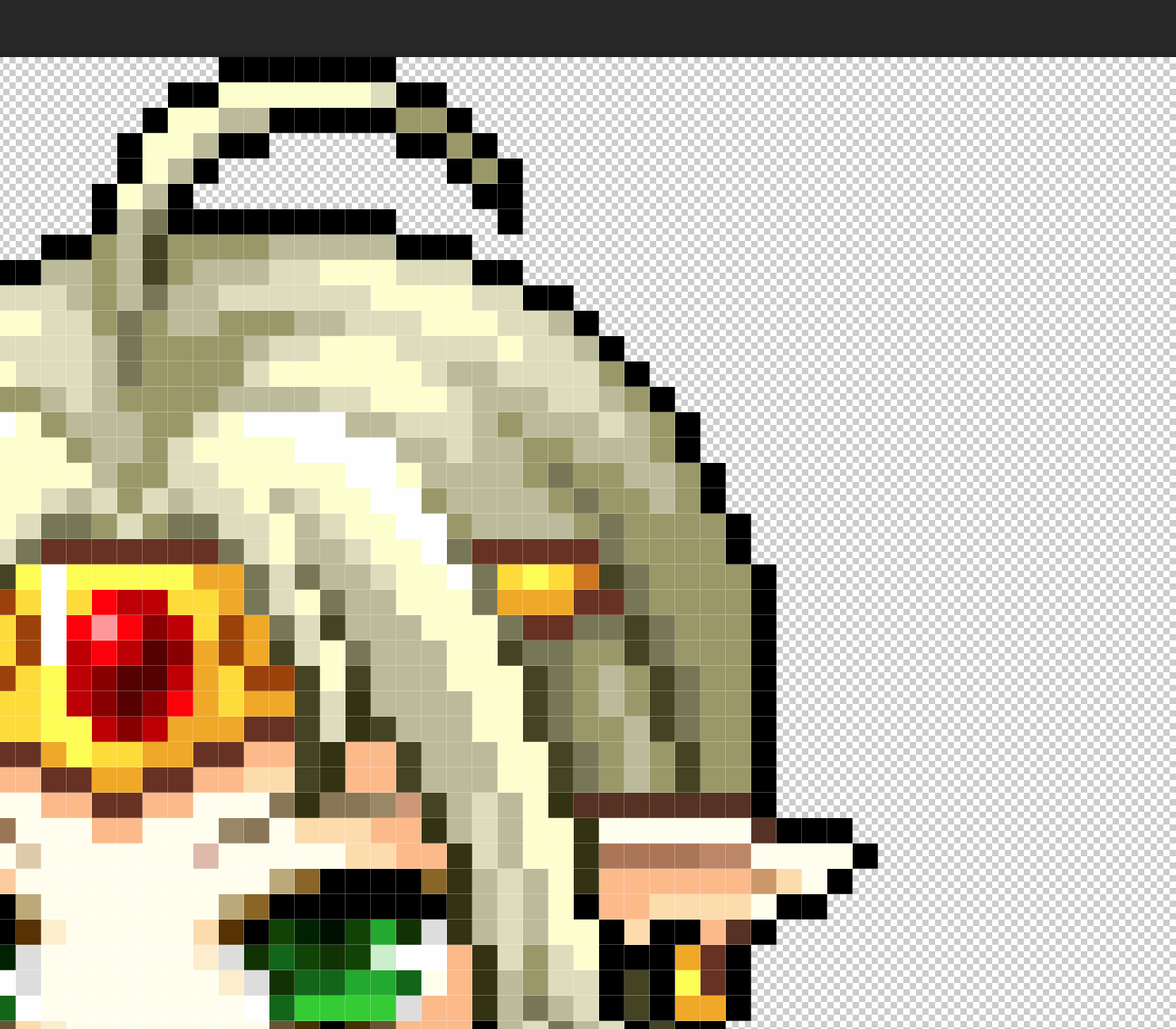
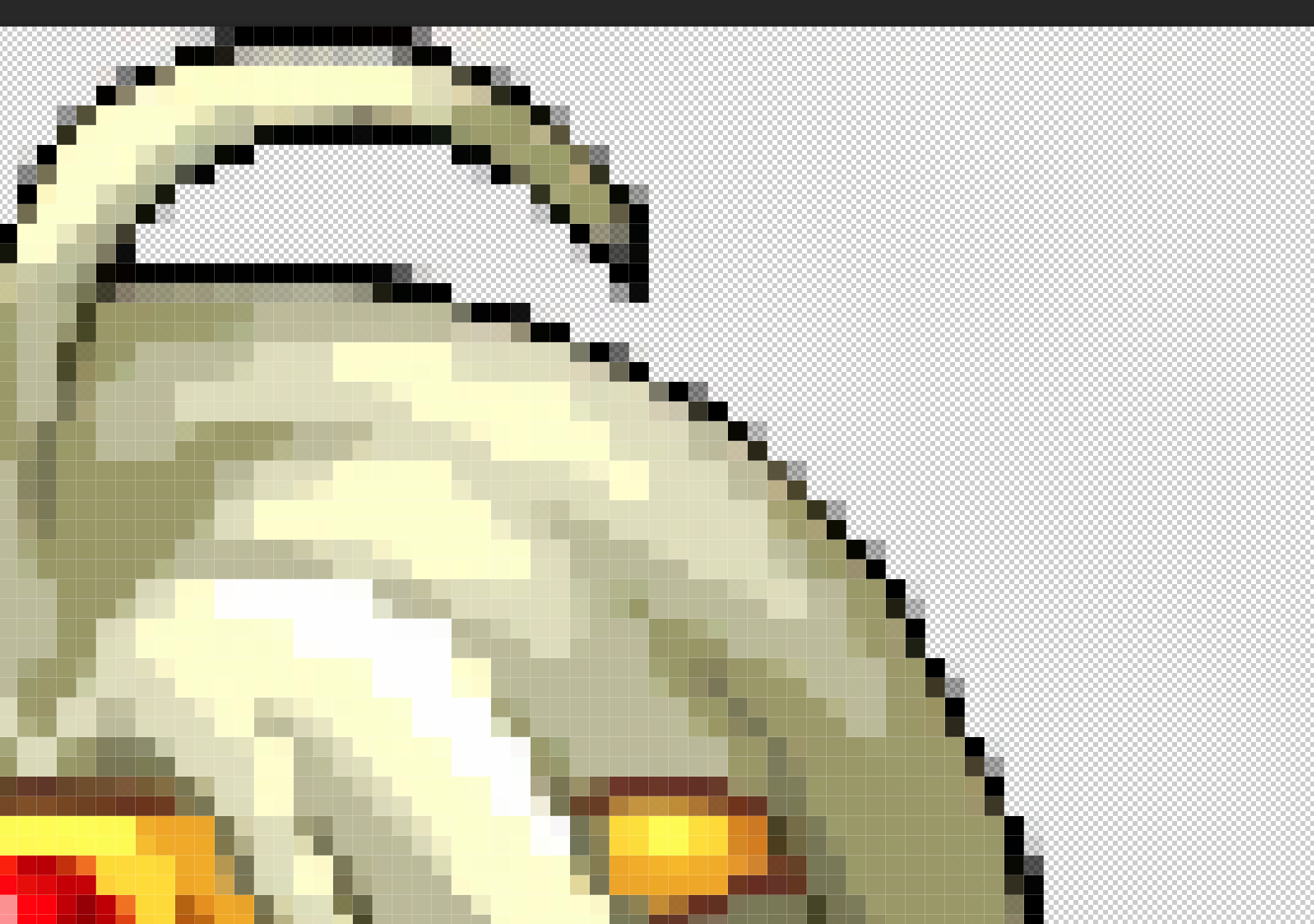

한계 2) 정답 데이터가 실존하지 않기에, 실제 디자이너의 평가가 아닌, 제 개인적인 평가 위주.
한계3) 레이어 구분 등을 지원하지 않음.
만약 회사의 실제 데이터가 layer를 구분하고 있다면, 그것은 어떻게 학습할 것인지? (크기부터 훨씬 작아짐)